Meet the frontline workers behind some of America’s most people-first cultures
Traditional vs. Modern Intranet: What's the Difference?
November 21st 2025
The traditional intranet made sense in 2010. Employees worked from cubicles, checked the homepage for company announcements each morning, and downloaded forms from HR when needed.
Only IT could update content, and employees couldn't post or contribute. Information moved top-down only.
Then work changed completely. Remote work became more permanent, and information scattered across Slack, Microsoft Teams, Zoom, and dozens of specialized apps.
The traditional intranet couldn't keep up. It was built for 9-to-5 office life, not today's 24/7 distributed teams who work from anywhere, anytime.
Modern intranet platforms filled this gap because they brought:
- AI-powered search that scans all your tools and platforms at once
- Personalized feeds that show each employee what matters to them
- Mobile-first design that works anywhere without VPNs
- Social features that let any employee easily share information and updates
- Integration hubs that connect Slack and Google Workspace in one place
- Automated workflows that handle approvals and routine tasks
If you're evaluating your intranet options, you need a clear picture of what's different between traditional and modern platforms.
Below, we’ll break down what each type delivers, what it costs, and how to match the right solution to your organization's needs.
Traditional vs. modern intranet features at a glance
Traditional and modern intranets take different approaches to the same problems. Here's an in-depth breakdown.
| Feature Category | Traditional Intranet | Modern Intranet |
|---|---|---|
| User Experience | Static pages, complex navigation, desktop-focused design | User-friendly interface, personalized dashboards, social media-like interaction |
| Search & Discovery | Basic keyword search, limited filters, manual tagging | AI-powered search, contextual results, intelligent recommendations |
| Integration Capabilities | Limited third-party connections, manual data entry | Native integrations with 100+ tools, single sign-on |
| Content Management | Manual uploads, version control issues, rigid folder structures | Automated workflows, real-time collaboration, dynamic content organization |
| Analytics & Insights | Basic page views, limited reporting | Advanced user analytics, content performance metrics, and engagement tracking |
| Security & Access | Role-based permissions, basic authentication | Advanced security protocols, conditional access, and compliance tools |
| Mobile Experience | Poor mobile optimization, limited functionality | Native mobile apps, full feature access, and offline capabilities |
| Customization | Template-based design, IT-dependent changes | Drag-and-drop builders, user-controlled personalization |
| Communication Tools | Top-down announcements, static news feeds | Two-way communication, polls, surveys, and community-building features |
| Workflow Automation | Manual processes, paper-based approvals | Digital workflows, automated approvals |
| Cost Structure | High upfront costs, expensive customizations | Subscription-based pricing, scalable plans, and included updates |
Bottom line: When we put these features side by side, it’s easy to see why modern intranets are becoming the standard. Traditional systems still work, but they're showing their age.
The evolution of intranet software for internal communication
Traditional intranets made perfect sense when they were built. But the workplace changed dramatically, and these systems couldn't evolve fast enough.
Here's how we went from basic file sharing to today's intelligent platforms:
- Phase 1: The Static Era (1990s-2000s) Companies built their first intranets as digital bulletin boards. Employees visited maybe once a month to find a form or check the holiday schedule. Search barely worked, mobile didn't exist, and "user experience" meant having a homepage that loaded.
- Phase 2: The Portal Years (2000s-2010s) SharePoint promised to organize everything in one place. Companies built complex portal structures with dozens of navigation menus. Collaboration meant checking documents in and out, but most people just emailed files instead because the system was too complicated.
- Phase 3: The Social Shift (2010s-2020s) Facebook and Twitter changed expectations. Platforms added social features, mobile apps, and cloud hosting. For the first time, employees could post their own content without IT approval. But integration was still weak since the intranet operated separately from email, chat, and other daily tools.
- Phase 4: The Intelligence Revolution (2020s-Present) Remote work exposed how broken traditional intranets really were. Modern platforms like Workvivo responded with fully functional mobile apps and social features that keep distributed teams connected. These modern tools became “employee experience platforms” that handle communication, culture, recognition, and productivity in one place.
Most traditional intranets are still stuck in Phase 2, trying to catch up with add-on features that don't quite work. Meanwhile, modern platforms have already moved past being "intranets" altogether.
Key features of a modern intranet
These are the features that define today's modern intranet software and digital employee experience platforms. Most traditional intranets have few or none of them:
- AI-powered search: Contextual search that understands intent, finds content across all connected apps, and auto-suggests relevant documents.
- Central hub for communications: All company communications flow through one platform, from CEO announcements to team updates.
- Cloud-native architecture: Everything runs in the cloud, so there's no hardware to maintain or software to update.
- Social engagement features: Employees can like, comment, share, and create their own content without IT involvement. Recognition features let peers celebrate wins publicly and build connections across distributed teams.
- Deep platform integration: Microsoft 365, Google Workspace, Slack, and other tools connect seamlessly. Employees work in their preferred apps while the intranet syncs everything in the background.
- Personalized employee experience: Each person sees a customized homepage based on their role, interests, and behavior. New hires get onboarding content, managers see team analytics, and everyone gets company information that matters most to them.
- Automated workflows: Routine processes like document management approvals, onboarding tasks, and policy acknowledgments run automatically.
- No-code content management: Anyone can create and publish content using drag-and-drop builders. Marketing can post updates, HR can share policies, and teams can build their own spaces (all without touching code or filing IT tickets).
- Enterprise-grade security: Single sign-on, multi-factor authentication, and advanced permissions keep data safe. Compliance features handle industry regulations while external sharing lets you securely collaborate with clients.
Cost analysis: traditional vs. modern intranet
Traditional systems often look cheaper on paper with one-time licensing fees, but their true costs hide in IT maintenance, poor adoption, and lost productivity.
Modern intranets charge predictable monthly fees that seem higher until you factor in everything else.
To make an apples-to-apples comparison, you need to consider all the costs and not just the sticker price:
| Cost Category | Traditional Intranet | Modern Intranet |
|---|---|---|
| Initial Setup | $50,000-$200,000+ (software, hardware, implementation) | $5,000-$25,000 (configuration and onboarding) |
| Annual License / Subscription | $10,000-$50,000 (perpetual license maintenance) | $30,000-$120,000 ($5-20 per user/month) |
| Infrastructure | $20,000-$40,000/year (servers, hosting, backups) | $0 (included in subscription) |
| IT Maintenance | 1-2 FTEs ($75,000-$150,000/year) | 0.25 FTE ($20,000-$40,000/year) |
| Upgrades & Updates | $25,000-$100,000 every 3-5 years | $0 (automatic, included) |
| Integration Development | $10,000-$30,000 per integration | $0-$5,000 (pre-built connectors) |
| Training Costs | $15,000-$30,000 (extensive training needed) | $2,000-$5,000 (intuitive design) |
| Content Migration | $20,000-$50,000 | $10,000-$25,000 |
| Customization | $30,000-$100,000 (developer required) | $0-$10,000 (no-code tools) |
| Mobile Development | $50,000-$150,000 (if even possible) | $0 (native apps included) |
| Security & Compliance | $10,000-$30,000/year | Included in subscription |
| Downtime Costs | $5,000-$20,000 per incident | Minimal (99.9% uptime SLA) |
Small companies (50-200 employees) face a tough choice. Traditional intranets demand $50,000-100,000 upfront, often their entire IT budget for the year. Modern platforms at $15-20 per user monthly ($15,000-48,000 annually) spread costs evenly and include everything, so they’re more manageable for limited budgets.
Medium companies (200-1,000 employees) save the most with modern platforms. Traditional systems at this scale need dedicated IT staff and regular infrastructure upgrades, which easily cost $300,000 a year. Modern intranets cost $50kl-150k yearly based on features. They cut total costs nearly in half, and there’s no need for specialized support staff.
Enterprise organizations (1,000+ employees) can negotiate both options heavily, but modern platforms scale better. Traditional enterprise intranets often become million-dollar projects that take years to implement. Modern platforms offer enterprise pricing around $5-10 per user monthly. This keeps costs predictable even at 10,000+ employees and avoids the consulting fees and custom development.
Bottom Line → Modern intranets cost less and deliver more value through predictable pricing and stronger features. Traditional systems may look cheaper upfront, but hidden costs and complex customizations make them much more expensive over time.
Security & compliance: traditional vs. modern approaches
When traditional intranets first came out, the biggest concern was keeping outsiders from accessing the company's private network.
Now, you have remote workers on personal devices, sophisticated phishing attacks, insider threats, and strict data privacy regulations to deal with.
Traditional intranets use perimeter security, so once you're in, you can access everything. Modern platforms don't trust anyone by default. They verify every user, every time.
Here's how traditional and modern approaches compare across different intranet security areas:
| Security Category | Traditional Intranet | Modern Intranet |
|---|---|---|
| Authentication | Basic username/password, limited SSO | Multi-factor authentication, advanced SSO, biometric options |
| Access Control | Role-based permissions, manual updates | Dynamic permissions, conditional access, automated provisioning |
| User Management | IT-dependent user setup/removal | Automated user lifecycle, self-service capabilities |
| Mobile Security | Limited mobile device controls | Device management, remote wipe, app-level security |
| Third-Party Integration Security | Weak API security, manual connections | OAuth 2.0, secure API gateways, certified integrations |
| Monitoring & Logging | Basic activity logs | Real-time threat detection, comprehensive audit trails |
| Compliance Automation | Manual reporting, document-based | Automated compliance workflows, real-time monitoring |
| Data Residency | Limited control over location | Configurable data centers, regional compliance |
| Incident Response | Manual processes, slow detection | Automated alerts, rapid response protocols |
Modern platforms handle regulations that didn't exist when traditional intranets were built. They automatically keep audit logs for GDPR requests, create SOC 2 compliance reports with one click, and update security features as regulations change.
Traditional systems force you to track everything manually, pay for expensive audits, and build custom solutions for each new rule.
When GDPR came along, modern platforms rolled out compliance features through automatic updates. Traditional intranets needed complete overhauls or expensive add-ons that still didn't fully comply.
Bottom Line → Traditional systems rely on perimeter security that breaks down with remote work and cloud integration, while modern platforms use zero-trust architecture purpose-built for today's distributed workplace threats.
User adoption & employee experience
Traditional intranets have an adoption problem that no amount of training can fix. Employees avoid them because they're hard to use, impossible to access remotely, and feel like stepping back into 2005.
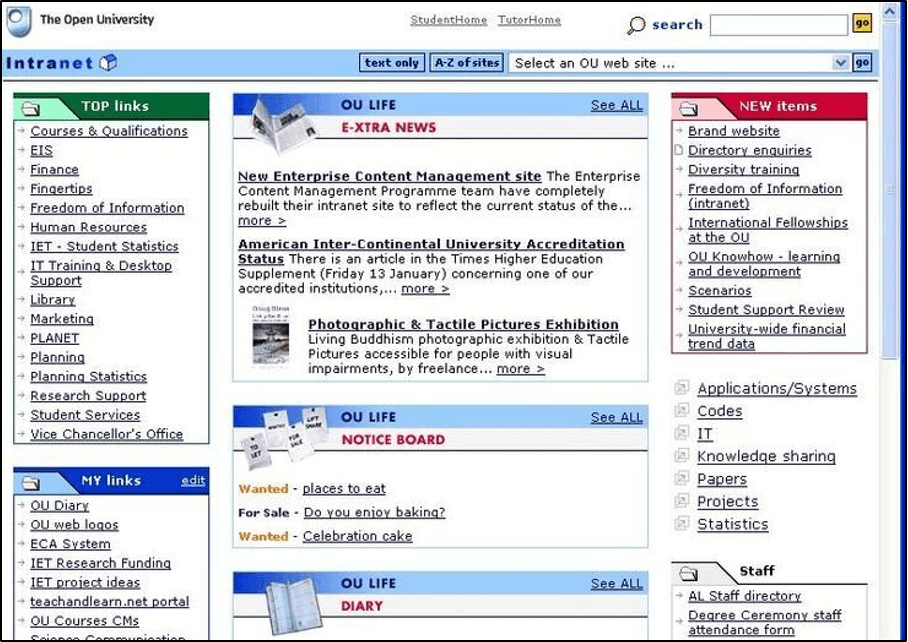
Look at this traditional intranet homepage – walls of text, endless navigation menus, and links that lead to more links. Employees need to know exactly where to click, and even then, they'll probably need three more clicks to find what they want.
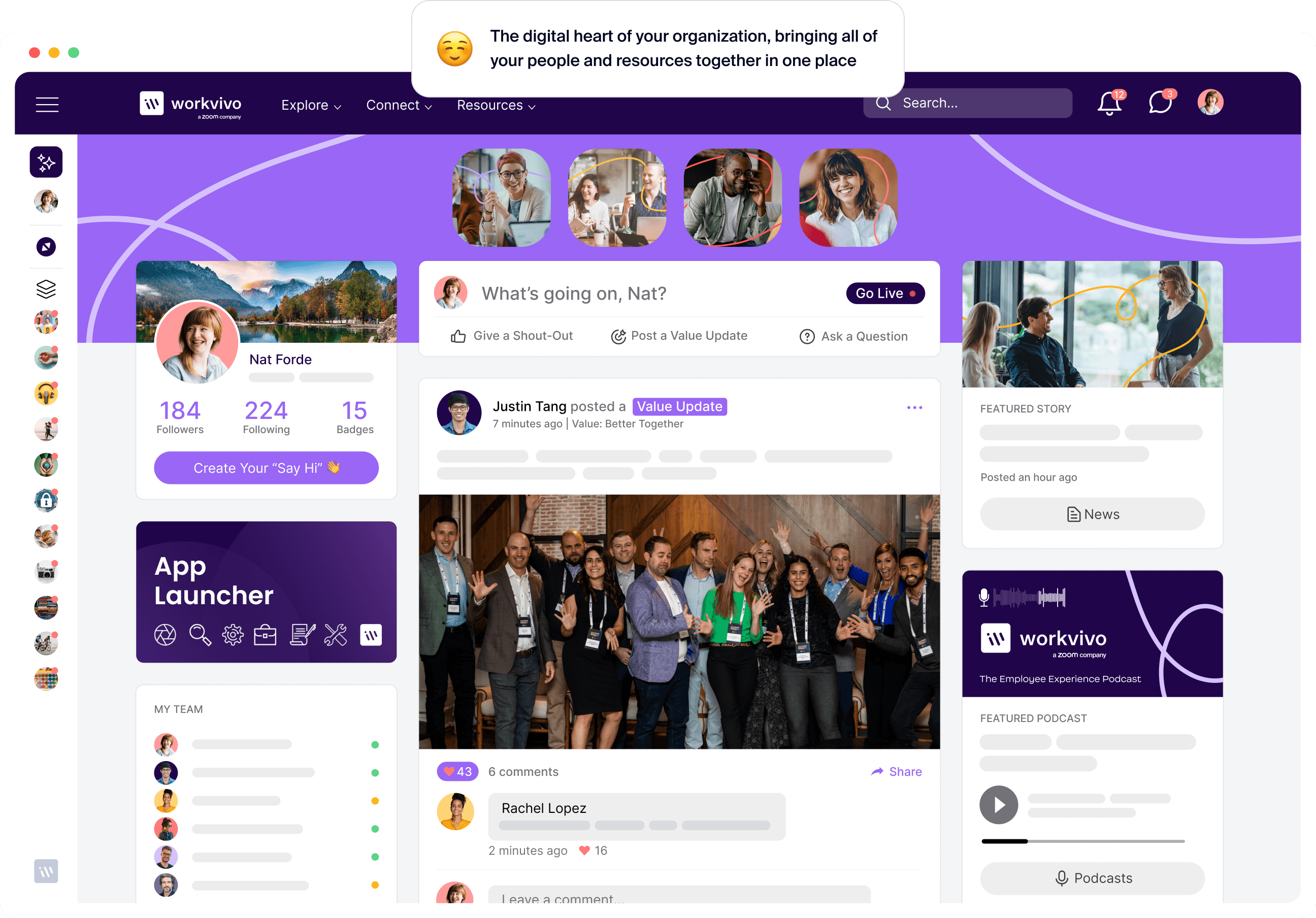
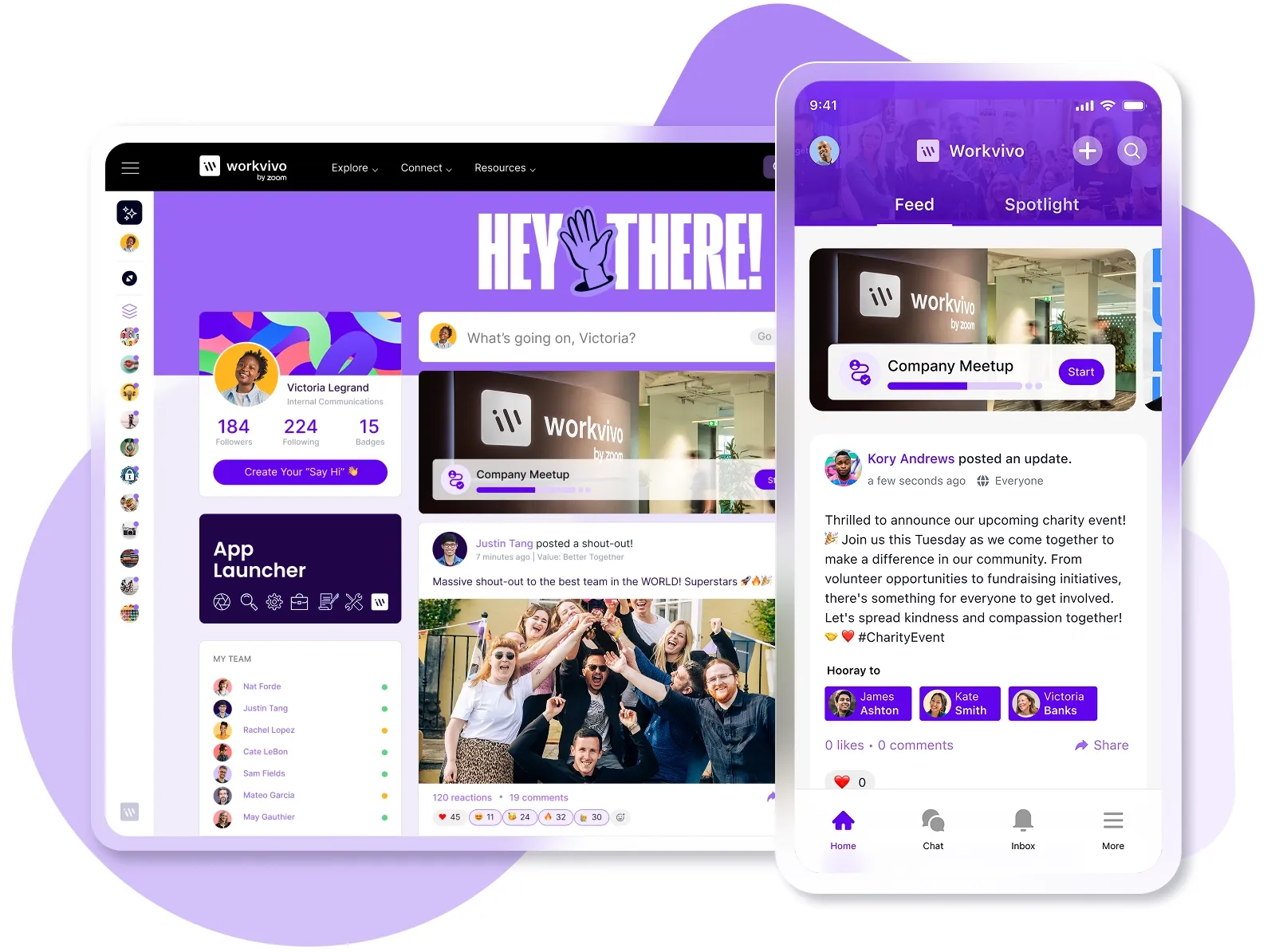
Now compare that to a modern platform like Workvivo. There are personalized content feeds, colleague updates, and quick access to tools. The interface feels familiar because it works like the social platforms people already use daily.
Plus, traditional intranets weren't built for phones. Most don't work on mobile at all, and the few that do need VPN connections, special browsers, or simply display a tiny version of the desktop site that's impossible to navigate.
Employees at home or on the road are completely cut off from company resources. Even checking the employee directory becomes a multi-step process that most people give up on.
Modern platforms like Workvivo offer native mobile apps that work like standard consumer apps. Full functionality fits naturally on a phone screen, and employees can check updates, respond to posts, access documents, and stay connected from anywhere.
Push notifications and instant messaging keep frontline workers in the loop without overwhelming them. The experience is so smooth that employees often prefer the mobile version to the desktop.
The adoption curve tells the whole story. Traditional intranets start weak and get weaker, while modern platforms build momentum from day one.
| Adoption Milestone | Traditional Intranet | Modern Intranet |
|---|---|---|
| Initial rollout | Heavy training required, resistance common | Intuitive design, minimal training needed |
| Week 1 | 40% of employees log in once | 85% daily active users |
| Month 1 | Usage drops to 25% | Usage stabilizes at 75-80% |
| Month 3 | Only mandatory tasks drive visits | Organic engagement grows |
| Month 6 | 20% regular users, mostly managers | 70%+ regular users across all levels |
| Year 1 | Considered a failure, needs "relaunch" | Integral part of the daily workflow |
| Long-term | Requires constant mandates to maintain any usage | Self-sustaining engagement, employees would complain if removed |
Think we're exaggerating? Look at Ryanair's results with Workvivo.
Of their 24,000 employees, 90% have registered on the platform – that's 21,500 users. At any given time, around 13,000 employees actively use Workvivo throughout the week.
Mark Duffy, Ryanair's Director of Talent, said:
"Of the 13,000 active users, probably 90% of that is cabin crew. They might post pictures some mornings of them onboard the aircraft, or there might be a nice sunrise," their team explains. "To have 13,000 active users on there on a weekly basis, for us, that's a good return on investment because we can actually see what's happening.
With Workvivo analytics, I can see whether it's the London Stansted base that is more actively engaged versus Birmingham, for example, and what stories they're liking. It's fantastic."
Advantages and disadvantages of each type
Both traditional and modern intranets have their place, but understanding the trade-offs helps you make the right choice.
Let's break down what each approach does well and where it falls short.
Traditional intranet advantages
- Lower upfront subscription costs make budgeting predictable for finance teams
- Proven track record with established vendors like Microsoft and IBM
- Deep customization options allow complete control over functionality and design
- Strong integration with existing on-premise systems and legacy software
- Familiar technology stack that current IT teams already understand
- Complete data control with on-premise hosting options
Traditional intranet disadvantages
- Terrible mobile experience or no mobile access at all
- Low adoption rates (typically 20-30%)
- Expensive IT maintenance, and you need dedicated staff
- Manual updates that require downtime and testing
- Poor search functionality that rarely finds what you need
- No social features or modern collaboration tools
- You need custom development for integrations
- An outdated user interface that employees avoid
- Knowledge silos with no easy way to share across teams
Modern intranet advantages
- An intuitive user interface that has minimal training and drives higher adoption
- Native mobile apps provide full functionality on any device
- Built-in social features increase employee engagement and employee communication
- Employees can publish without IT help
- Automatic updates and maintenance reduce IT workload
- Pre-built integrations connect seamlessly with popular business tools
- AI-powered search finds relevant content across all connected systems
- Predictable subscription pricing includes all features and support
- Cloud-based infrastructure scales automatically with company growth
Modern intranet disadvantages
- Dependent on the vendor for service and features
- Less customization flexibility than custom-built solutions
- Limited control over data hosting locations with some vendors
- Dependency on internet connectivity for full functionality
Migration strategies: transitioning from traditional to a modern company intranet
Migrating from a traditional to a modern intranet feels overwhelming, but it's more straightforward than most companies expect. You just need a structured approach and NOT try to do everything at once.
Most organizations complete the entire content migration in three to six months, and employees often prefer the new intranet system within the first few weeks.
- Assessment (Phase 1) Audit what you already have, and more importantly, what people most often use. Most traditional intranets are 90% dead content that hasn't been touched in years. Run analytics to outline your top 100 visited pages, survey employees about what they need, and don't be afraid to archive instead of migrate.
- Platform selection (Phase 2) Choose a platform based on your specific needs, not a feature checklist. Focus on user experience, mobile capabilities, and integration with tools you already use. Get demos from three to four vendors and involve employees in the evaluation.
- Content migration (Phase 3) Don't migrate everything. Start with your most important content, like HR policies, current projects, and commonly accessed resources. Archive old content so you don’t clutter your new platform, and use this opportunity to update outdated information. Many companies find they only need to migrate 10-20% of their intranet content.
- Launch strategy (Phase 4) Avoid the "big bang" launch that overwhelms everyone at once. Start with a pilot group of enthusiastic early adopters, collect feedback and refine, and then roll out department by department.
Timeline expectations: Small companies (<200 employees) can typically migrate in six to eight weeks. Medium organizations (200-1,000 employees) might need two to three months. Large enterprises (1,000+ employees) should plan for three to six months, though pilot groups can launch much sooner.
PRO TIP: Workvivo's dedicated onboarding team has successfully migrated over 100 million pieces of content for customers, with setup typically taking just days to weeks, depending on company size. The "Spaces" feature lets you create department-specific micro-communities during migration, so teams can start collaborating immediately without waiting for the full company rollout.

Benefits of modern intranet solutions in today's digital workplace
The difference between traditional and modern intranets becomes clear when you look at the results. Modern platforms deliver these specific benefits:
- Improves internal communication: Modern intranets create a single source of truth where all company updates, policies, and news stay in one searchable place. 85% of companies say that faster access to relevant information is a major benefit of their modern intranet.
- Drives employee engagement: Social features, peer recognition, and company-wide conversations help employees feel connected even when working remotely. Teams can celebrate wins together, see what other departments are working on, and participate in company culture.
- Streamlines employee onboarding and training: New hires can access all training materials, policies, and FAQs from one organized location. HR teams can track progress automatically while employees learn at their own pace. Studies show that nearly 90% of employees with strong onboarding experiences become more engaged in their work.
- Increases productivity: Employees stop wasting hours hunting for documents or recreating work someone else already finished. Quick access to templates and resources means more time doing actual work. Research from McKinsey shows that well-connected employees can be 20-25% more productive than those working in isolation.
- Supports knowledge sharing and retention: Modern intranets capture knowledge in shared spaces rather than personal inboxes. This stops the “brain drain” that happens when experienced employees move on and take years of expertise with them.
- Reduces employee turnover: Recognition happens publicly and in real-time, not just during annual reviews. Remote workers feel included in daily conversations and company culture. Companies with collaborative digital workplaces like this reduce turnover by up to 50%.
- Strengthens workplace culture: Virtual events and shared traditions unite employees across all locations and time zones. Everyone participates equally regardless of where they work. When employees feel their voice shapes the culture, they're nearly 5x more likely to perform at their best.
Why a modern digital workplace with Workvivo is a no-brainer
The choice between traditional and modern intranets is pretty clear at this point. Modern platforms work better, cost less over time, and people don’t need practically any training to start using them.
And when you're ready to make the switch, Workvivo offers everything you need in a single platform.
Workvivo is a modern, all-in-one employee experience platform that brings internal communication, peer recognition, advanced analytics, and collaboration tools in a social media-style interface that works seamlessly across desktop and mobile.
Here’s exactly what you can expect:
- Complete mobile-first experience: All features work seamlessly across desktop and mobile, and instantly reach your entire workforce wherever they are. The dedicated mobile app keeps remote and field teams connected with the same functionality as desktop users.
- Social-first communication: Workvivo's familiar consumer-grade design creates a social experience where employees can post updates, share achievements, and engage through comments and reactions. The interface feels familiar to Facebook, LinkedIn, and Instagram.
- Seamless integration ecosystem: Native integrations with Microsoft 365, Zoom, Google Workspace, and 40+ HR and payroll platforms create a unified workspace experience. The app launcher feature gives employees one-click access to all their tools without leaving the platform.
- Recognition and culture-building tools: Built-in recognition tools let employees celebrate accomplishments with badges, awards, and shout-outs tied to company values. Peer-to-peer recognition happens publicly and in real-time, so you can build a culture of appreciation that doesn’t feel forced.
- Direct leader-to-employee connection: Give executives real ways to connect with their teams through live broadcasts, recorded videos, and internal podcasts. Leaders can host Q&A sessions and share company news that reaches every employee, from headquarters to remote locations.
- Enterprise-grade security and compliance: Workvivo holds ISO 27001 certification, maintains GDPR compliance, and uses a zero-trust security model for maximum protection. Backed by Zoom's best-in-class technology, the platform provides enterprise security without compromising usability.
Your employees deserve better than a digital filing cabinet from 2005.
Book a demo with Workvivo and experience the difference that modern employee experience platforms make.
Intranet FAQs
Is a modern intranet more secure than a traditional one?
Modern intranets protect your company better than traditional systems because they're built for today's threats. They come with multi-factor authentication and zero-trust security models already built in.
You'd have to bolt these features onto a traditional intranet with extra tools and updates, and they still wouldn't work as well. Modern platforms design security into every feature from day one, while traditional systems try to patch in protection after the fact.
Can a traditional intranet be updated to become modern?
You can upgrade traditional intranets with new features and integrations, but their old architecture holds them back. Most companies discover that modernizing legacy systems costs more and causes more headaches than just switching to a new platform.
What are the biggest challenges when implementing a modern intranet?
The main challenge is typically content migration. You have to decide what to move from the old systems and what to leave behind. Employee adoption is usually much smoother with modern platforms since they're built to be intuitive, but some change management is still needed to help teams adjust their workflows.
Technical integration has become much easier with modern platforms that offer pre-built connections to popular business tools.
How long does it take to see ROI from a modern intranet?
Most companies see productivity improvements in the first month. Employees find information faster and waste less time on admin work.
You'll probably see the full payoff in 3-6 months once everyone's using the platform regularly. You can then measure real results through better communication, fewer emails, and projects that finish faster.
Discover more content on modern intranet:
- The Modern Intranet for 2026: Core Elements, Features + Benefits
- Advantages and Disadvantages of Intranets: Complete Guide for 2026
- 9 Intranet Alternatives to Modernize Your Digital Workplace This Year
- I Spent 30+ Hours Comparing Intranet Platforms: Here Are the 9 Clear Winners
- Intranet Pricing Guide: How Much Does An Intranet Really Cost?
- How to Choose the Best Intranet Platform for Your Organization
- Your 9-Step Plan for a Successful Intranet Implementation
- How to Improve Intranet Adoption With These Proven Methods
- Intranet vs. Digital Workplace: What’s the Difference?
- Intranet Replacement: Modern Alternatives to SharePoint and Legacy Platforms
- On-Premise Intranet vs. Cloud-Based Intranet: Comparison Guide for IT Teams and Enterprises
- The Buyer's Guide to a Scalable Intranet: Key Considerations and Evaluation Tips
- How a Modern Intranet Improves Employee Onboarding Experiences
- How to Develop an Intranet Knowledge Management Strategy
- The 10 Best Hybrid Workplace Solutions (Ranked & Rated)
- Intranet Governance Framework for a Successful Company Intranet
- 7 Secure Intranet Software Vendors for Security-Focused IT Teams
- Intranet Hosting & Deployment Options: Which Do You Need?
- The 5 Most Important Intranet Integrations for Maximizing Your Digital Workplace
- How to Create an Intranet Content Strategy
- 14 Real Company Intranet Examples for Different Industries
- What is an Intranet Portal? Everything You Need to Know
- What Is Intranet CMS + 6 Best Options
- 15 Best Intranet Platforms & Solutions on the Market Right Now
- Top 6 Social Intranet Solutions (+ Benefits, Features & Best Apps)
- Enterprise Intranet: Use Cases & Top Rated Vendors for 2026
- 15 Intranet Best Practices for Better Employee Engagement
- 10 Top Use Cases and Benefits of an Intranet
- The Ultimate Guide to Intranet Security: Best Practices, Threats & Solutions
- Using Intranet for Effective Internal Communications: Advantages, Best Practices and Top Tools to Get Started
- What is a SaaS Intranet? Benefits, Features & Best Intranet Solutions
- Intranet Analytics: Best Practices for Measuring Adoption and Success
- Are Intranets Still Relevant? (And How They're Evolving)
- Top 25 Intranet Features for a Connected Workplace
- Exploring the Value of Intranet Benchmarking: What To Know
- The Definitive Guide to Measuring Intranet ROI In 2026
- Intranet Requirements Checklist to Support an Intranet Needs Analysis
- 10 Reasons Building Your Own Intranet Is a TERRIBLE Idea
- Intranet Metrics: Top 6 KPIs to Track (+Real Examples)
- How To Implement an Intranet Migration Without the Headache