The Comms Show: Virgin Voyages’ Strategy for Connecting a Global Workforce | March 10th 11am EDT / 3pm GMT
The 10 Best Hybrid Workplace Solutions (Ranked & Rated)
November 21st 2025
Remote work was supposed to be a temporary solution during the pandemic. Three years later, we’re never going back.
According to a Zoom study, 95% of business leaders say they’ve become more flexible since 2022, and 82% plan to go even further. Hybrid work has officially become the default for millions of professionals.
Employees love flexibility. You control your environment, save time on your commute, and choose where you work best. For many, this beats the old 9-to-5 office grind
But hybrid work also comes with trade-offs. This Reddit user articulated what many remote workers quietly struggle with:
I can relate. It's very hard to be remote when your team is in person - not that I want to be in person but so many conversations happen and relationships are build due to proximity alone. No need to quit however until you find something else. Good luck.
The watercooler chat, the after-work drinks, and the energy of a shared space disappear when everyone’s behind a screen.
This is why you need hybrid workplace solutions that connect distributed teams, preserve company culture, and keep everyone in sync.
We analyzed user feedback and features across dozens of platforms to outline the 10 platforms that work best for hybrid teams like yours.
Why hybrid workplace solutions matter
Traditional office tools don’t work when half your team is remote. Neither do fully virtual solutions that ignore in-person collaboration.
Here’s what purpose-built hybrid platforms bring to the table:
- They bring flexibility across all work styles: Some employees thrive in office spaces, others at home, which explains why 60% want hybrid work arrangements. Hybrid solutions support both work styles, so people can choose where they're most productive and keep everyone connected to the team.
- They streamline daily operations: 22% of workers lose two-plus hours each week to tool fatigue as they jump between Slack, Zoom, Asana, and five other apps. Integrated hybrid platforms consolidate these functions into one place, which cuts context switches and keeps work on track.
- They optimize real estate and reduce costs: Hybrid work models can bring 10% to 50% savings in space utilization through smart-desk booking and occupancy analytics. Companies right-size their footprint with hot-desking, pay only for the space they use, and offer coworking options when employees want variety.
- They boost retention through better user experience: 71% of leaders report that hybrid work improves employee happiness. They combat isolation with pulse surveys, bring work-life balance through flexible work schedules, and create virtual spaces where employees feel valued and heard.
What to consider when choosing a hybrid workplace platform
Not all hybrid platforms work for every organization. Before you invest, evaluate solutions against these key criteria to find one that matches your team’s size, culture, and goals.
- Integration with your existing tech stack: Your new platform should upgrade your current tools, not replace them. Look for native integrations with Microsoft 365, Google Workspace, Slack, and your HRIS to avoid data silos and duplicate work.
- Communication features that reach everyone: Not everyone checks email or Slack religiously. Strong platforms offer multiple channels like mobile push notifications, digital signage, and even SMS to ensure critical messages reach every employee.
- Culture and engagement capabilities: Virtual happy hours aren’t enough to maintain culture. Seek platforms with recognition programs, social feeds, peer-to-peer shoutouts, and pulse surveys that create genuine connections across distances.
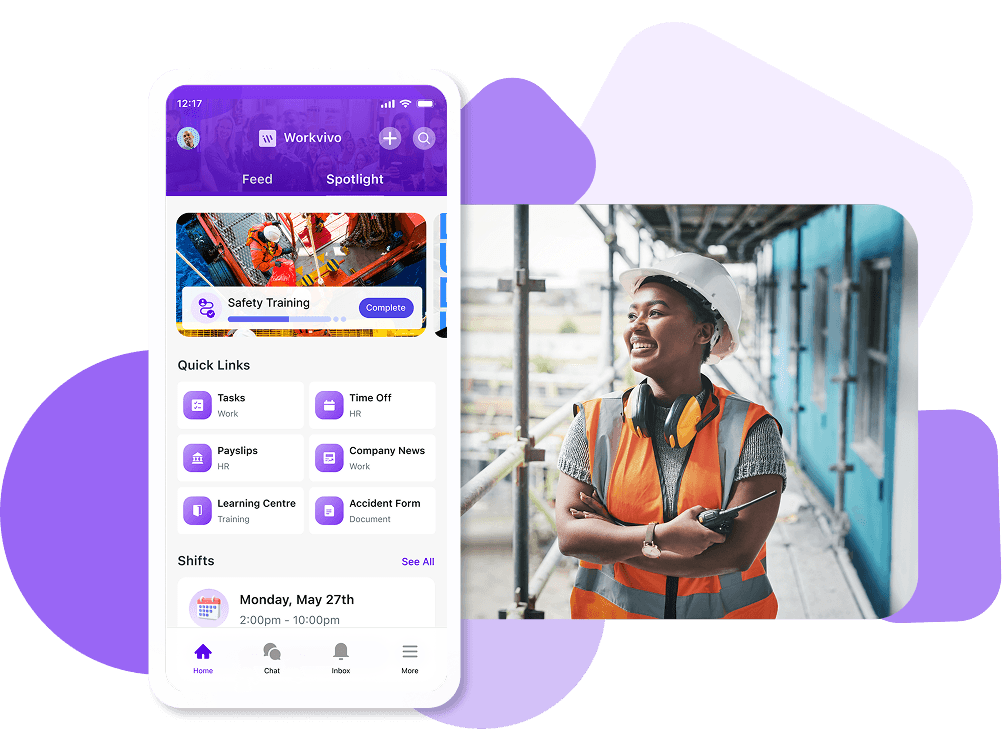
- Mobile-first design for frontline workers: Desk workers aren’t your only employees. Platforms should work flawlessly on phones for retail staff, field teams, and anyone without constant computer access.
- Automation for routine workflows: Manual processes sabotage productivity in distributed teams. Look for automated onboarding, birthday notifications, announcement scheduling, and workflow triggers that save HR teams hours weekly.
- Scalability across locations and languages: Your platform should grow with you. Multi-language support, regional customization, and infrastructure that handles thousands of users ensure you won’t outgrow your investment.
- Security and compliance standards: Remote access increases risk. Verify SOC 2 compliance, GDPR readiness and SSO support to protect your company and employee information.
The best 10 hybrid workplace solutions (ranked & rated)
Choosing a hybrid workplace solution shouldn’t require a PhD in vendor comparison.
We spent weeks researching the market, reading user reviews, and analyzing feature sets to see which platforms work best for distributed teams.
Here are the 10 platforms that might be worth your time and budget.
1. Workvivo (our favorite)
Best for: Organizations tired of low intranet adoption that want a modern, mobile-first platform employees naturally embrace like consumer social media.
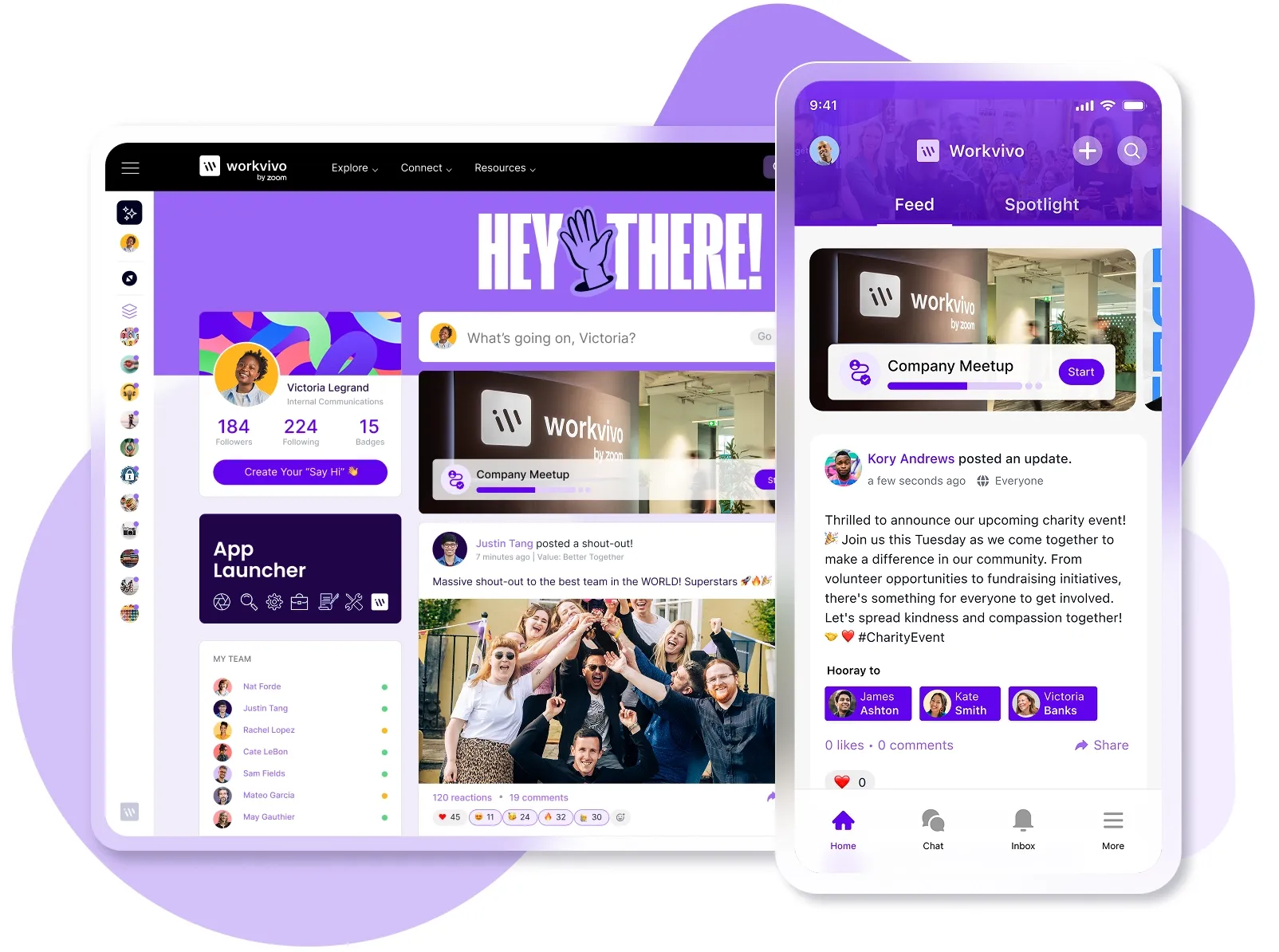
Workvivo is an employee experience platform that combines the familiarity of social media with enterprise-grade communication tools.
Acquired by Zoom in 2023, it brings together internal communications, engagement, recognition, and analytics into one intuitive platform where employees connect through social feeds, shoutouts, and community spaces.
Key features
- Mobile-first design for location flexibility: The platform delivers complete functionality on mobile devices, so hybrid teams can get equal access whether they’re working from headquarters, home, or anywhere in between.
- Multi-channel communication suite for diverse work styles: You can reach every employee through their preferred channel – whether that’s activity feeds, podcasts during commutes, livestreams for all-hands meetings, or chat for quick questions. There’s also auto-translation into 90+ languages.
- Social recognition ecosystem with shoutouts, badges, and awards: Public peer-to-peer recognition tied to company values, with customizable labels (kudos, high-fives, thank you) and integration with Workday for permanent employee records.
- Digital workplace hub that replaces scattered tools: Workvivo brings together your entire tech stack through 40+ integrations, and builds one unified platform where hybrid employees access everything from HR systems to productivity tools.
- Real-time sentiment tracking across all locations: The platform collects continuous feedback from all employees through quick polls and pulse surveys accessible on any device. Analytics dashboards break down sentiment by location and team, so leaders know if remote workers feel less connected than their office counterparts.
What do G2 users like about Workvivo
Workvivo has been a great addition to our modern workplace. It makes communication easy, keeps everyone in the loop, and helps celebrate team wins in a fun, engaging way.
It feels more like a social platform than a traditional intranet, which helps build connections, especially in a hybrid environment. I’d recommend it to colleagues looking for a better way to stay informed, engaged, and connected across teams.
- G2 Review, Marsha L.
What real-world companies say about Workvivo
SDL Surveying is the UK’s largest independent provider of mortgage valuations. With 260 employees split equally between office-based hybrid workers and remote surveyors, the company needed to bridge the gap between field teams and office staff who rarely crossed paths.
Before Workvivo, SDL Surveying cycled through platforms that never quite fit. Facebook Workplace served them well during the pandemic, but lost momentum once employees returned to normal routines.
Their switch to Microsoft’s Viva Engage (formerly Yammer) also disappointed everyone. Remote surveyors found it particularly difficult to engage with multiple platforms while managing their field work.
Today, SDL Surveying runs all communication through Workvivo. Field surveyors access critical lender rules and job information on their phones, while office teams can share updates through the same platform.
Here are some of the key results from SDL Surveying’s Workvivo implementation:
- 90%-plus employee activation rate with growing engagement
- 260 employees across office and remote locations unified on one platform
- 5 months from decision to platform rollout with a structured launch approach
- Weekly planning calls with detailed Gantt charts to track progress
- Recruited Workvivo champions from both office and remote teams for broader adoption

Sarah Tuck, Director of People and Facilities, described the rollout:
It’s probably the most structured launch of a third-party system I’ve ever been through.
2. Zoom
Best for: Companies with 100-1,000 employees that need reliable video conferencing as their primary communication tool, plus webinars and team chat.
Zoom has grown from pure video conferencing into a full hybrid workplace platform called Zoom Workplace.
It bundles video meetings, team chat, phone system, digital whiteboard, AI meeting assistant, and workspace booking tools into one integrated solution for distributed teams.
Key features
- AI Companion for meeting intelligence: Automatically generates meeting summaries, extracts action items, and creates searchable transcripts so remote employees can quickly catch up on discussions they missed.
- Team Chat integrated with meeting rooms: Persistent messaging channels that connect directly to video calls, so teams can continue conversations before and after meetings with full context.
- Whiteboard for visual collaboration: Digital canvas accessible from any device where hybrid teams can brainstorm, diagram, and plan together in real time or asynchronously.
What do G2 users like about Zoom
What I like best about Zoom Workplace is its seamless integration of multiple tools – meetings, chat, phone, and whiteboard – into a single, user-friendly platform.
The interface is intuitive, video and audio quality are consistently excellent, and features like breakout rooms, screen sharing, and smart scheduling make teamwork highly productive. It’s a true all-in-one collaboration hub that supports both remote and hybrid work solutions.
- G2 Review, Rupesh K.
What do G2 users dislike about Zoom
The interface can feel a little busy, and it’s annoying when they move buttons on updates. But honestly, these are just minor issues.
- G2 Review, James C.
Pricing
Zoom offers a free Basic plan for 40-minute meetings with up to 100 participants. Paid plans include:
- Pro (€15.99/user/month billed monthly): 30-hour meetings, unlimited cloud storage, and AI Companion for meeting summaries and scheduling.
- Business (€20.99/user/month billed monthly): Everything in Pro plus 300 participants, SSO, managed domains, and unlimited whiteboards.
- Enterprise (custom pricing): Adds 1000 participants per meeting, unlimited Zoom Phone with PBX features, Workspace Reservation, and a dedicated customer success manager.
Note: Prices shown are for European markets. US pricing starts at $14.99/user/month for Pro and $21.99 for Business plans.
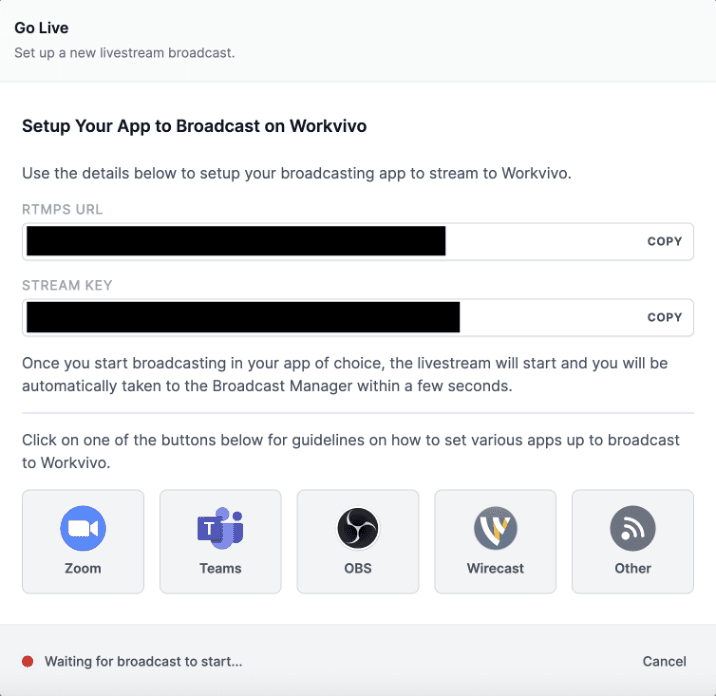
PRO TIP 💡: Since Zoom acquired Workvivo, the platforms work together seamlessly. You can livestream Zoom meetings directly to Workvivo for employees who missed them, start Zoom calls from colleague profiles, and even access Workvivo right inside your Zoom desktop app.
3. Microsoft Teams
Best for: Enterprises already using Microsoft 365 that want unified communication, collaboration, and productivity tools in one ecosystem.
Microsoft Teams is a collaboration hub within Microsoft 365 that integrates chat, video meetings, file storage, and Office apps into a single workspace.
The platform seamlessly connects with Word, Excel, PowerPoint, and SharePoint, so it’s the natural choice for companies already operating within Microsoft’s ecosystem.
Key features
- Teams Rooms for hybrid-optimized conference spaces: Purpose-built hardware and software solutions with intelligent cameras that frame speakers automatically and provide individual video streams for remote participants to see everyone clearly.
- Together Mode and Front Row layouts for hybrid meetings: Special video layouts place remote participants in a shared virtual space or give them equal visual presence alongside in-room attendees.
- Shifts and Frontline Worker tools: Schedule management, task assignment, and mobile-first experiences built specifically for retail, healthcare, and field workers who aren’t at desks.
What do G2 users like about Microsoft Teams
Microsoft Teams brings together chat, video calls, file sharing, and collaboration into one central platform, reducing the need to switch between multiple apps.
The deep integration with Microsoft 365 makes it easy to co-edit documents in real time, schedule meetings directly from Outlook, and keep project communication organized in channels.
- G2 Review, Amol K.
What do G2 users dislike about Microsoft Teams
One of the biggest challenges is the performance and speed of the platform. Teams can be slow to load, lag during video calls, or freeze when multiple features like file sharing, screen sharing, or apps are running at once. This can interrupt productivity, especially during important meetings.
“The user interface, while comprehensive, can feel overwhelming and cluttered, particularly for new users or those who are part of several teams and channels.
“Navigating between chats, files, meetings, and tasks sometimes feels unintuitive, and important messages or documents can easily get buried in threads.
- G2 Review, Vonsha W.
Pricing
Microsoft Teams offers several tiers:
- Free: Unlimited chat, 60-minute meetings with 100 participants, 5GB cloud storage per user.
- Teams Essentials ($4/user/month): 30-hour meetings with 300 participants, 10GB cloud storage, meeting recordings, and transcripts.
- Microsoft 365 Business Basic ($6/user/month): Includes Teams plus web versions of Office apps, 1TB OneDrive storage, and Exchange email.
- Microsoft 365 Business Standard ($12.50/user/month): Adds desktop Office apps, webinar hosting, and attendee registration.
- Enterprise plans (E3 at $36/user/month, E5 at $57/user/month): Advanced security, compliance tools, analytics, and phone system capabilities.
4. Slack
Best for: Fast-moving companies where instant messaging drives work forward and email feels too slow for daily collaboration.
Slack is a channel-based messaging platform that organizes team communication into topic-specific channels to reduce email and keep conversations searchable and transparent.
Purpose-built for async-first hybrid teams, it connects with over 2,600 external tools and uses AI to summarize conversations and surface important information.
Key features
- Huddles for spontaneous voice and video conversations: You can start instant audio or video calls directly from any channel or DM, with screen sharing and live captions, to recreate the “quick desk drop-by” for remote workers.
- Workflow Builder for automation: No-code automation tools that streamline routine tasks like PTO requests, standup collection, and onboarding. This brings consistent processes whether employees work from home or the office.
- Slack Connect for external collaboration: Employees can share channels with clients, vendors, and partners outside your organization to keep hybrid project teams coordinated in one place.
What do G2 users like about Slack
Slack is the best communication medium, especially for a hybrid team that has remote workers or work-from-home users.
Connection is easy, just need to install it on a computer or smartphone and you are ready to go, no other implementation process needed, it only takes at most 30 minutes to finish setup.
- G2 Review, Mario S.
What do G2 users dislike about Slack
Slack is great for fast communication, but it can easily become overwhelming. Channels pile up, notifications never stop, and important messages get buried quickly – especially in busy workspaces.
And while Slack reduces emails, it can create pressure to respond instantly, which makes deep work harder.
- G2 Review, Aaron L.
Pricing
Slack offers the following pricing plans:
- Free: Limited to 10,000 most recent messages, 10 integrations, and 1-on-1 video calls.
- Pro ($8.75/user/month billed monthly): Unlimited message history, unlimited integrations, guest accounts, and group video calls with up to 50 participants.
- Business+ ($18/user/month): Adds SSO, compliance exports, 99.99% uptime SLA, and user provisioning.
- Enterprise+ (custom pricing): For organizations with over 500 users, includes unlimited workspaces, advanced security, and dedicated support.
5. Google Workspace
Best for: Small to mid-sized businesses that want cloud-native collaboration tools with real-time co-editing and simple, intuitive interfaces.
Google Workspace combines Gmail, Drive, Docs, Meet, Calendar, and Chat into an integrated cloud platform where teams collaborate in real time from any device.
The platform runs entirely online, which gives hybrid teams immediate access from any device with automatic saves and seamless handoffs between locations.
Key features
- Spaces for project-based collaboration: Organized hubs that combine chat, files, tasks, and video calls around specific projects or teams, so hybrid workers have a central place to collaborate without switching contexts.
- Smart scheduling and location features: Calendar automatically finds meeting times across time zones, books rooms based on attendance, and shows who’s working from home or office on any given day
- Google Meet hardware and companion mode: Series One Room Kits provide AI-powered noise cancellation and automatic framing for conference rooms, while companion mode lets in-office workers join meetings on personal devices for equal participation with remote colleagues.
What do G2 users like about Google Workspace
Google Workspace provides a seamless environment for collaboration and productivity. Tools like Gmail, Calendar, Drive, Docs, and Meet are fully integrated, which eliminates silos and improves workflow efficiency.
Real-time document collaboration is especially valuable for distributed teams, as it reduces delays and ensures everyone is working on the latest version.
The ecosystem is reliable, cloud-based, and accessible from anywhere, making it a strong fit for both hybrid and remote work environments.
- G2 Review, Ritika S.
What do G2 users dislike about Google Workspace
“There are a few quirks when switching between personal and business accounts, especially when using multiple logins. Occasionally, permissions get a bit confusing when sharing files across organizations.
“Also, while the tools are strong, the admin console can feel a bit overwhelming for first-time users managing users and settings at scale.”
- G2 Review, Dav L.
Pricing
Google Workspace offers a 14-day free trial across all tiers:
- Starter ($8.40/user/month): 30GB storage, 100-participant video meetings, custom business email, basic security features.
- Standard ($16.80/user/month): 2TB storage, 150-participant meetings with recording, appointment booking pages, Gemini AI assistant in Gmail and Docs.
- Plus ($26.40/user/month): 5TB storage, 500-participant meetings with attendance tracking, Vault for retention and search, enhanced security controls.
- Enterprise Plus (custom pricing): 5TB+ storage, 1000-participant meetings with in-domain live streaming, data loss prevention, AI classification for Drive, and advanced endpoint management.
All plans include Gmail, Drive, Docs, Sheets, Slides, Meet, Calendar, and Chat with 24/7 support.
PRO TIP 💡: Workvivo integrates smoothly with Google Workspace through SSO authentication and document access. Employees can search for files across their connected Google Drive directly from Workvivo, access their Gmail and Calendar within the platform, and maintain single sign-on between both systems.
6. LumApps
Best for: Large enterprises (1000+ employees) that need a sophisticated intranet with AI features and deep Google Workspace or Microsoft 365 integration.
LumApps is an AI-powered intranet platform for enterprise organizations that centralizes internal communications, HR resources, and business apps into a single platform.
After its 2025 merger with Beekeeper, LumApps now delivers comprehensive solutions for both desk-based and frontline workers.
Key features
- Deep Microsoft 365 and Google Workspace integration: As a Google-recommended platform and Microsoft Gold Partner, LumApps seamlessly integrates with both ecosystems so employees can access documents, collaborate, and communicate without platform switches.
- Unified platform for desk and frontline workers: The combined LumApps-Beekeeper platform connects both office and frontline employees through mobile-first experiences.
- AI-powered personalization and content recommendations: Machine learning delivers personalized content recommendations, relevant communities, and people connections based on each employee’s role and behavior.
What do G2 users like about LumApps
LumApps is an easy-to-use platform with tons of great features that have allowed us to provide our staff with an exciting and engaging variety of content.
“It has allowed us to create a virtual community for our staff to stay plugged into everything that goes on within our organization, and keeps us connected while we continue to work in a hybrid work environment.
- G2 Review, Anonymous User.
What do G2 users dislike about LumApps
The analytics are lacking, especially for trying to figure out a user journey within the intranet platform, and there is NO click analytics. As a PM, it makes it very hard to prioritize which tools/widgets are actually being used in a certain site.
- G2 Review, Dany C.
Pricing
LumApps uses custom enterprise pricing based on package tiers and user count. You need to talk to their sales team for a direct quote.
7. Unily
Best for: Global enterprises (5,000+ employees) that want a modern intranet with AI capabilities and strong governance controls for distributed teams.
Unily is an enterprise employee experience platform that combines intranet, internal communications, and social collaboration features with AI-powered personalization and search.
Key features
- Dual mobile solutions for different workers: Unily Go provides a streamlined app for frontline workers with direct messaging and community features, while Unily Mobile offers full digital workplace capabilities for knowledge workers who need deeper integration.
- Advanced content management and targeting: Drag-and-drop page building, multi-channel publishing (email, mobile, digital signage), and sophisticated audience segmentation that delivers personalized content based on role, department, or location.
- Enterprise-grade security and compliance: ISO 27001, SOC 2 Type II, and GDPR compliance with granular content permissions, SSO/MFA support, regional data hosting, and full audit trails that meet the strictest enterprise rules.
What do G2 users like about Unily
The platform really gives us a lot of flexibility. There is a huge amount of “out of the box” functionality that allows us to build our employee intranet and other solutions pretty quickly. And it lets our content creators create engaging content without requiring support from IT.
On the flip side, the product allows for a great deal of custom development and configuration, and we have taken full advantage of this to develop really cool solutions to business problems.
- G2 Review, Steve B.
What do G2 users dislike about Unily
Regarding functionality (that the site is supposed to have), it often takes weeks to resolve.
As a smaller company, we wondered if perhaps the problems we experienced with their product were prioritized behind larger clients.
- G2 Review, Tara C.
Pricing
Unily uses custom enterprise pricing based on platform modules and user count.
While specific pricing isn’t public, industry sources say that costs typically start around $5,000/month for mid-sized deployments.
8. Blink
Best for: Companies with 500-5000 frontline workers in retail, healthcare, or hospitality that need a mobile-first communication platform.
Blink is a mobile-first employee “super-app” that’s built specifically for frontline and deskless workers who don’t have regular access to desktop computers or corporate email.
Key features
- Social media-style newsfeed for frontline engagement: Blink brings company updates through a familiar, Facebook-like interface that frontline workers find intuitive, with targeted content delivery based on location, role, or department.
- Automated employee journeys and triggers: You can create onboarding sequences, anniversary messages, and milestone communications that publish automatically based on employee data.
- Mobile-first design for deskless workers: Built specifically for employees without desks or corporate devices, Blink works seamlessly on personal smartphones with features like offline access, low data usage, and support for 11 languages.
What do G2 users like about Blink
The mobile app keeps everyone up to date with the latest news, direct messages, and company announcements.
One of the strengths is the way it streamlines and consolidates communication, which has allowed us to improve team engagement and foster better alignment between different departments.
- G2 Review, Brandon Z.
What do G2 users dislike about Blink
Often, important messages are ignored or not noticed because the feed is crowded with personal posts from team members.
Blink could use more innovation that allows pushing mass private messages and the ability to connect a team member to a workgroup rather than a 1:1 message.
- G2 Review, Jamie W.
Pricing
Blink has two main pricing tiers:
- Business plan ($4.50/user/month): For businesses up to 1,000 users. Includes branded apps, company newsfeed, directory, CMS, chat, hub, SSO login, recognition and kudos, mandatory reads, employee journeys, digital forms, frontline intelligence, and pulse surveys.
- Enterprise plan (custom pricing): For organizations with 1,000+ users. Includes everything in Business plus API access, full survey capabilities, advanced workforce analytics, SharePoint and Box integrations, and automated user management (SCIM). You need to contact sales for quotes.
Both plans include a free trial option. The Business plan has immediate trial access, while Enterprise requires a sales consultation.
9. Staffbase
Best for: Multinational corporations that need branded employee apps with automatic translation into 110+ languages and regional content targeting.
Staffbase is an AI-native employee communications platform that orchestrates content across branded apps, intranets, email, SMS, and digital signage from one central hub.
It brings hyper-personalized communications to both office and frontline workers through its agentic AI features.
Key features
- AI-native foundation with Employee AI: Staffbase plans to release a conversational AI assistant that helps employees complete tasks, hyper-personalized podcasts (100,000 unique podcasts for 100,000 employees), and AI content governance that automatically marks outdated information before it reaches workers.
- Multi-channel orchestration from one platform: You can manage branded employee apps, desktop intranets, email campaigns, SMS, and digital signage from a single interface.
- Deep Microsoft 365 and SharePoint integration: Two-way integration with Microsoft tools, including Teams, SharePoint, and Viva Connections, plus Azure-based infrastructure with Entra ID for user management.
What do G2 users like about Staffbase
Staffbase helped us to connect to our frontline staff, bridging the gap between the organisation and their employees.
The system is very easy for creating channels, news and scheduling content, and the employees love posting their good news stories.
- G2 Review, Philip B.
What do G2 users dislike about Staffbase
Staffbase is a relatively complicated tool, so it requires significant time and resources to deploy.
This is to be expected given that it is very comprehensive, but without the right level of internal resources, it won’t achieve its potential. The menu in the app version is a bit “clunky” and not as slick a UX as other mobile app menus.
- G2 Review, Andrew R.
Pricing
Staffbase uses custom enterprise pricing with plans starting at approximately $30,000/year for a minimum of 1,000 employees, according to third-party sources.
10. Simpplr
Best for: Mid to large organizations with mixed desk and frontline workforces that need mobile-first communication with advanced content personalization.
Simpplr is an AI-powered employee experience platform that helps hybrid and distributed teams stay connected through a modern intranet with integrated communication tools.
The platform combines AI-driven search, personalized content delivery, and no-code configuration to create a unified digital workplace that bridges the gap between remote, hybrid, and office workers.
Key features
- AI-powered hybrid workspace search: Federated search across 200+ integrated apps helps hybrid workers instantly find people, documents, and information regardless of whether resources sit in office systems or cloud tools.
- Location-based content and personalization: Automatically delivers different content to remote versus office employees, such as desk booking info for those coming in or virtual event details for remote workers.
- Mobile-desktop parity for hybrid flexibility: Full-featured mobile apps ensure employees switching between home and office have identical access to all platform capabilities.
What do G2 users like about Simpplr
I’ve been using Simpplr in my company for over a year now, and I have to say, it’s had such a huge effect on how we stay connected, especially with so many of us working remotely or in hybrid environments.
The interface is minimal, intuitive, and requires little training. I’m able to access updates from leadership, see critical documents, and understand what’s happening with various teams without having to dig through emails or shared drives.
- G2 Review, Fidel F.
What do G2 users dislike about Simpplr
It’s not very customizable. The design is quite simple and doesn’t allow for many creative features to be explored, leaving with a more basic visual design.
- G2 Review, Javier B.
Pricing
Simpplr provides custom pricing for organizations with 100+ employees. The platform runs on an annual subscription model that includes core features, quarterly updates, and global support.
While exact costs aren’t public, plans scale based on company size and selected features.
Implementation & migration
Moving to a new hybrid workplace platform takes anywhere from one afternoon (Slack) to six months (enterprise LumApps).
The timeline depends less on technology and more on your organization's complexity – and how much old data you need to migrate.
Here’s what to realistically expect:
- Quick starts (1 to 7 days): Slack, Teams, and Google Workspace can launch immediately, but actual adoption takes four to six weeks as teams break old habits. It’s a good fit for small teams that only need basic communication.
- Standard rollouts (2 to 4 weeks): Mid-tier platforms like Workvivo, Zoom Workplace, and Blink need basic setup and system integration. Workvivo often launches faster than competitors because employees already know how to use social media interfaces.
- Enterprise deployments (3 to 6 months): LumApps, Unily, and enterprise Staffbase rollouts need extensive planning with IT security reviews, content governance setup, and careful change management for thousands of users.
You should also keep in mind that your data is probably messier than you think. Every company believes its employee data is organized until migration begins. Then you discover:
- Half of your employees exist under different names in different systems
- Department structures in your HRIS don’t match
- Years of documents in SharePoint with broken permissions
- Content in local languages that needs review before migration
Platforms with strong migration support make this bearable. Workvivo, for instance, provides dedicated migration specialists who handle the technical complexity while your team focuses on content and adoption.
Final verdict: Why Workvivo leads the pack
Most hybrid workplace tools fail because they’re boring. Employees log in once, poke around, and never return.
Meanwhile, your remote workers grow more isolated, your office teams grow more frustrated, and everyone wonders why “collaboration” feels so hard.
Workvivo works because it feels familiar. While other platforms try to reinvent how people communicate, Workvivo borrowed what already works from social media and added the features businesses need. Employees know how to use it from day one.
Here’s what sets Workvivo’s digital hub above the rest:
- Mobile apps work exactly like desktop, so field workers get the full experience
- Teams can share updates through videos, podcasts, or simple posts based on what works for them
- Public shoutouts and badges make sure remote workers get recognized just like office staff
- All your work tools integrate into a single platform, so employees stop switching between apps
- Pulse checks show you when remote teams feel left out before it becomes a problem
Book a demo to see how Workvivo bridges the distance and builds one unified culture, regardless of where your teams log in from each morning.
Discover more content on modern intranet:
- The Modern Intranet for 2026: Core Elements, Features + Benefits
- Advantages and Disadvantages of Intranets: Complete Guide for 2026
- 9 Intranet Alternatives to Modernize Your Digital Workplace This Year
- I Spent 30+ Hours Comparing Intranet Platforms: Here Are the 9 Clear Winners
- Intranet Pricing Guide: How Much Does An Intranet Really Cost?
- Traditional vs. Modern Intranet: What's the Difference?
- How to Choose the Best Intranet Platform for Your Organization
- Your 9-Step Plan for a Successful Intranet Implementation
- How to Improve Intranet Adoption With These Proven Methods
- Intranet vs. Digital Workplace: What’s the Difference?
- Intranet Replacement: Modern Alternatives to SharePoint and Legacy Platforms
- On-Premise Intranet vs. Cloud-Based Intranet: Comparison Guide for IT Teams and Enterprises
- The Buyer's Guide to a Scalable Intranet: Key Considerations and Evaluation Tips
- How a Modern Intranet Improves Employee Onboarding Experiences
- How to Develop an Intranet Knowledge Management Strategy
- Intranet Governance Framework for a Successful Company Intranet
- 7 Secure Intranet Software Vendors for Security-Focused IT Teams
- Intranet Hosting & Deployment Options: Which Do You Need?
- The 5 Most Important Intranet Integrations for Maximizing Your Digital Workplace
- How to Create an Intranet Content Strategy
- 14 Real Company Intranet Examples for Different Industries
- What is an Intranet Portal? Everything You Need to Know
- What Is Intranet CMS + 6 Best Options
- 15 Best Intranet Platforms & Solutions on the Market Right Now
- Top 6 Social Intranet Solutions (+ Benefits, Features & Best Apps)
- Enterprise Intranet: Use Cases & Top Rated Vendors for 2026
- 15 Intranet Best Practices for Better Employee Engagement
- 10 Top Use Cases and Benefits of an Intranet
- The Ultimate Guide to Intranet Security: Best Practices, Threats & Solutions
- Using Intranet for Effective Internal Communications: Advantages, Best Practices and Top Tools to Get Started
- What is a SaaS Intranet? Benefits, Features & Best Intranet Solutions
- Intranet Analytics: Best Practices for Measuring Adoption and Success
- Are Intranets Still Relevant? (And How They're Evolving)
- Top 25 Intranet Features for a Connected Workplace
- Exploring the Value of Intranet Benchmarking: What To Know
- The Definitive Guide to Measuring Intranet ROI In 2026
- Intranet Requirements Checklist to Support an Intranet Needs Analysis
- 10 Reasons Building Your Own Intranet Is a TERRIBLE Idea
- Intranet Metrics: Top 6 KPIs to Track (+Real Examples)
- How To Implement an Intranet Migration Without the Headache