
The Comms Show: Virgin Voyages’ Strategy for Connecting a Global Workforce | March 10th 11am EDT / 3pm GMT
Your 9-Step Plan for a Successful Intranet Implementation
November 21st 2025
Research from Harvard Business Review shows that roughly 70% of organizational changes don’t achieve their intended results. Intranet projects are no exception to this trend.
Despite the investment, the planning meetings, and the vendor promises, most intranets end up ignored and underused within months of launch.
Employees bookmark their way around it, email files instead of storing them centrally, and continue the very silos you hoped to break down.
And most intranets fail for the same handful of reasons:
- Announcing the launch without explaining what changes for users
- Filling the intranet with corporate jargon and outdated policies
- Treating the project as purely an IT initiative
- Launching without training or communication plans
- Going live with outdated, irrelevant, or missing content
- Setting unrealistic deadlines that sacrifice quality and preparation
The good news is that these failures are preventable. And below, we’ll walk you through a nine-step roadmap that helps you sidestep these common pitfalls.
Before you begin: Setting the stage for your timeline
Where legacy systems often took six to 12 months to deploy, today’s cloud platforms can go live in weeks. But speed alone doesn’t guarantee success.
Organizations that invest in proper preparation see stronger adoption rates, while those that rush through setup often spend months trying to convince employees to use the new system.
Your timeline will depend on a few key factors:
- Whether your content is already organized or scattered across email threads, shared drives, and department silos
- How many existing systems need to connect to your intranet (from HR databases to document repositories to communication tools)
- The scope of your rollout – launching to a single office or coordinating across multiple locations and time zones
- Your organization’s comfort level with new technology and history of successful (or failed) digital transformations
- Whether you have people who can focus on this project or need to juggle it alongside their regular responsibilities
And while every organization is unique, these typical timelines can help you set realistic expectations with stakeholders:
| Company size | Typical timeline | Main focus areas |
|---|---|---|
| Under 500 | 2-4 weeks | Quick setup, basic integrations, rapid rollout |
| 500-2,000 | 3-6 weeks | Department coordination, content migration |
| 2,000-10,000 | 4-8 weeks | Multiple integrations, governance framework |
| 10,000+ | 6-12 weeks | Global coordination, compliance requirements |
These timelines assume you have executive backing and at least one dedicated resource managing the project. Without both, you might have to add a few more weeks to your estimate.
The good news is that modern cloud platforms (like Workvivo) let you launch core features quickly and expand over time. You don’t need everything perfect on day one.
Phase 1: Strategy and foundation (estimated: 2-4 weeks)
The foundation phase determines everything that follows. Skip these steps to save time, and you’ll spend months trying to fix problems that proper planning would have prevented.
You’ll spend this time defining clear objectives, sorting through existing content, and building an information structure that makes sense to actual users.
Step 1: Define your goals & metrics
So many intranets fail because they start with vague objectives like “improve communication” or “break down silos”.
Sure, these sound great in meetings, but they don’t mean much in practice.
You have to attach numbers to your goals. They have to deal with specific problems your employees complain about in the break room or mention in exit interviews.
Here’s how to make your goals more specific:
| Vague goal | Specific goal | How to measure |
|---|---|---|
| “Improve communication” | Reduce all-company emails by 30% | Track email volume, platform announcement views |
| “Increase engagement” | Get 70% of employees actively using the platform monthly | Monthly active users, login frequency |
| “Better knowledge sharing” | Reduce time to find documents from 15 to 5 minutes | User surveys, search success metrics |
| “Strengthen culture” | Double employee recognition activities | Recognition posts, kudos given, and participation rates |
| “Connect remote workers” | Remote staff are as active as office workers | Usage data by location, engagement scores |
| “Streamline onboarding” | New hires are productive in the first week vs. the first month | Manager feedback, time to first contribution |
Once you go live, you can track how many people log in each week, which content gets the most views, and whether people can find what they’re looking for when they search. Most platforms give you this data automatically.
And keep in mind that each department sees the intranet through its own lens and wants it to manage its concrete problems.
- HR teams want to stop answering the same policy questions over and over. They need a place where employees can find company information, submit time-off requests, and complete onboarding tasks without any hand-holding.
- IT departments are tired of “Where do I find X?” tickets that flood their queue. They want organized documentation and fewer interruptions for basic information requests.
- Leadership needs a reliable way to reach everyone with important announcements.
- Managers struggle to keep distributed teams aligned on projects. They need insights into what everyone’s working on and tools that make team collaboration less painful.
- Employees just want to find information quickly, feel more connected to their coworkers, and get recognition when they do good work.
The trick is to find goals that make everyone happy without trying to do everything at once. Look for the common threads – almost every department wins when people can find information easily and when email volume drops.
For example, you can build a good knowledge base, and IT sees fewer “Where is this document?” requests while HR onboards new hires faster because everything sits in one place.
Step 2: Conduct a content audit
Your biggest temptation will be dumping everything from your old systems into the new intranet. Don’t. You’ll just create a prettier version of the same chaos employees avoid today.
Instead, treat this migration like moving houses, where it’s the perfect time to throw out what you don’t need.
You can sort your existing content into three buckets:
| Keep as-is | Update first | Don't migrate |
|---|---|---|
| Current HR policies | Employee handbook from 2019 | Old company newsletters |
| Active expense forms | Popular but poorly organized FAQs | Duplicate versions of files |
| Recent training materials | Outdated org charts | Event flyers from last year |
| Brand guidelines and logos | Process docs nobody can follow | Broken links and dead pages |
| Current benefits information | Contact lists with former employees | Draft documents were never finalized |
Every piece of content needs an owner, someone responsible for accuracy and updates. Don’t let this fall entirely on IT or communications teams.
Department heads know which documents their teams use most and which policies matter. HR owns employee handbooks, finance owns expense procedures, and project managers own their team resources.
And be realistic about clean-up timelines. If you have 500 documents to review and update, and each takes 30 minutes, that’s over 30 full workdays of effort.
It’s better to launch with 50 excellent resources than 500 questionable ones. You can always add more content after launch, but you can’t easily recover from employees losing trust because they found outdated information – or suffered content overwhelm – on day one.
Step 3: Design your information architecture (IA)
McKinsey’s research shows employees waste roughly 20% of their time hunting for information or tracking down colleagues who might have answers. That’s a full day every week lost to poor organization.
Poor information architecture is usually the culprit. Companies organize content by department structure instead of how people naturally think and work.
Most companies structure their intranets like their org chart, with separate sections for HR, IT, Finance, and Marketing. But employees don’t think in departmental terms when they need help.
They think in tasks, like “I need to request time off” or “I need to find our brand guidelines”. Your navigation should match these mental models.
Start with how people naturally group information:
- Company hub: Announcements, leadership updates, company events
- People hub: Employee directory, org charts, team spaces, who’s who
- Resources hub: Policies, forms, how-to guides, training materials
- Tools hub: Integrated apps, quick links to other systems, productivity tools
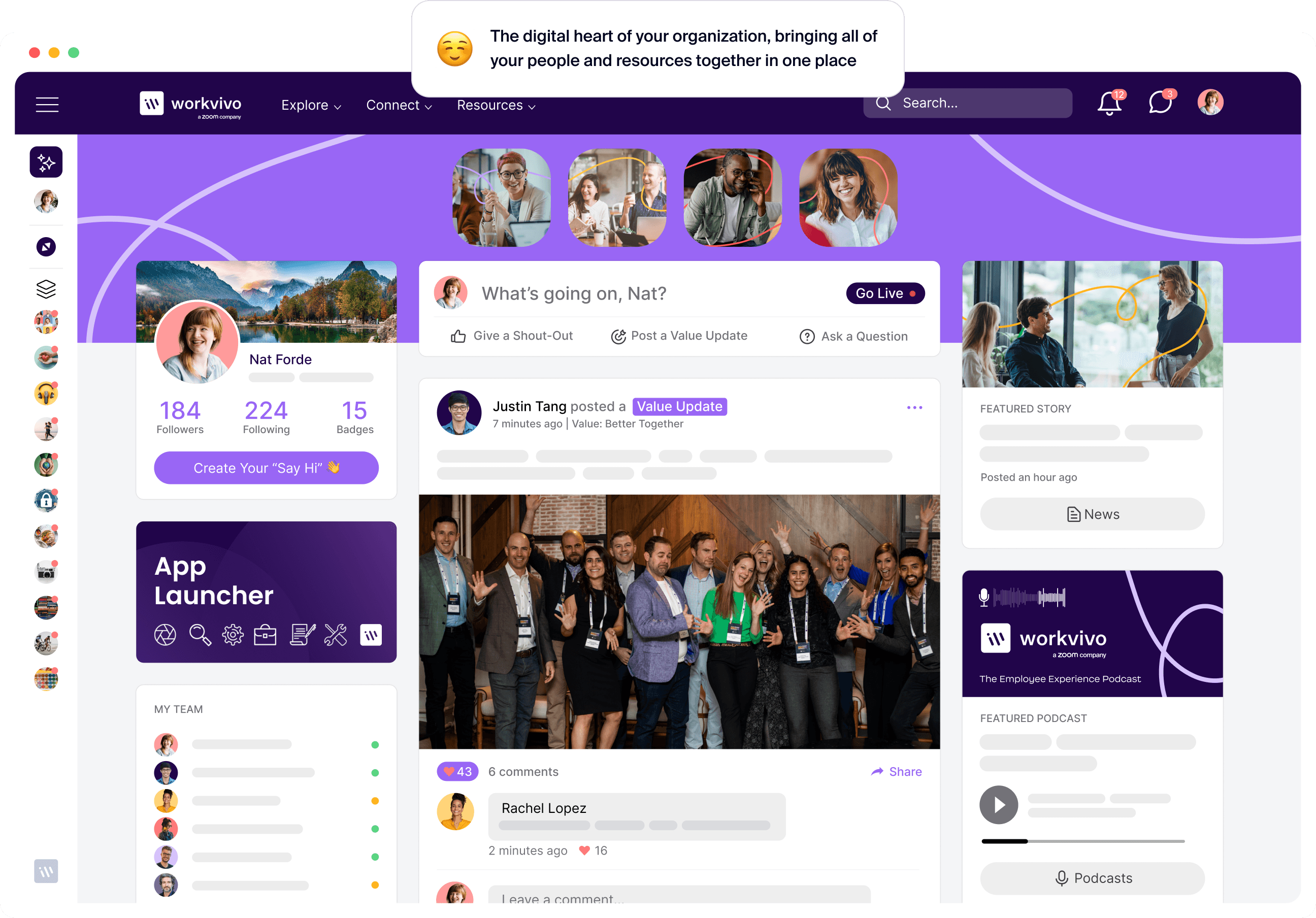
Notice how Workvivo’s navigation uses plain language – “Explore”, “Connect”, and “Resources” rather than corporate jargon. The activity feed sits front and center where employees expect to see what’s new.
And quick actions like “Give a Shout-out” and “Ask a Question” are immediately visible, not buried three clicks deep.
Also, try to avoid internal jargon like “Human Capital Management” when “People & HR” works better. Skip department names like “Corporate Communications” in favor of task-based labels like “Company News”.
Apply the “mom test” to your final navigation structure. If you showed your homepage to your mom (or any outsider), could she figure out where to find basic information?
If she can’t guess where vacation policies are or how to find someone’s contact information, your structure probably needs more work.
Phase 2: Build, brand, and populate (estimated: 4-6 weeks)
This is where your intranet starts looking like your intranet, and not just another software tool.
You’ll give it personality, populate it with content, and prepare your team to manage it. By the end of this phase, you’ll have something real to show stakeholders.
Step 4: Brand your new intranet
Your intranet’s name matters more than you think. Generic labels like “employee portal” or “intranet” don’t inspire anyone to log in. It’s like naming your dog “Dog”.
Your employees use Instagram, Spotify, and Netflix daily. They expect tools at work to feel just as polished and intentional, even if they serve different purposes.
Start with these branding basics to give your platform personality:
- Memorable name: Pick something people naturally say, like “check the loop” instead of “access the internal communications platform”.
- Custom logo or icon: Design a simple mark that works at 16px favicon size and looks good on phone home screens (think Slack’s hashtag or Notion’s building block).
- Company colors and fonts: Use your primary brand color for CTAs and navigation, but don’t overdo it. Keep text readable with your standard fonts, not decorative ones.
- Welcoming homepage message: “Morning! Here’s what’s happening today at [Company]” rather than “Welcome to the Corporate Information Management System”.
- Friendly email notifications: “Sarah just recognized you!” beats “System Notification: Recognition Received”.
- Branded login page: Feature your office photos or team celebrations as backgrounds, add your company’s tagline, or maybe include a rotating “employee spotlight” quote.
- Real employee photos: Grab candids from company events, team lunches, or even good Zoom screenshots. Anything but those generic “diverse professionals smiling at laptop” shots.
- Custom community spaces: Engineering might have a user-friendly “Ship It” space with emoji reactions, while HR runs “Culture Club” with different personalities. Let each area set its own cover images and welcome messages.
Avoid the trap of corporate sterility. Your intranet shouldn’t feel like it was designed by the compliance department. If your company culture is casual and creative, your intranet should reflect that.
If you’re more formal and structured, that’s fine too – just make sure it still feels human. The goal is to make employees feel at home, not like they’re visiting a government website.
Step 5: Configure the platform & migrate content
Trying to migrate everything at once is like moving homes by throwing all your belongings in a truck without any boxes or labels. Things break, items disappear, and you spend weeks hunting for your everyday basics.
Plan your intranet migration in manageable chunks that build confidence along the way:
| Phase | What to Migrate | Timeline | Success Criteria |
|---|---|---|---|
| Phase 1: Essentials | Current policies, employee handbook, contact lists, critical forms | Week 1 | No broken links, all documents open correctly |
| Phase 2: High-Traffic | FAQs, popular templates, training materials, brand assets | Week 2-3 | Search returns correct results, permissions work |
| Phase 3: Active Content | Team spaces, project documents, recent announcements | Week 3-4 | Users can access their team's content |
| Phase 4: Archives | Historical documents, old newsletters, reference materials | Post-launch | Available but not cluttering the main navigation |
This phased approach lets you spot problems early when they’re easier to fix. If permissions are broken on 10 documents, you can fix them quickly. If they’re broken on 10,000-plus, you have a crisis.
But even with careful planning, migrations rarely go perfectly. Watch out for these common headaches:
- File paths break when you move content between systems, so links that worked perfectly before suddenly lead nowhere
- Permission settings translate incorrectly during migration and lock out users who need access
- Large training videos and presentation files fail to upload completely and leave you with corrupted content that doesn’t work on launch day
- File names with special characters or unusual spacing cause system errors that only appear when employees try to open documents
- Bulk content uploads bring floods of automatic email notifications that overwhelm employee inboxes before launch
- Connected systems like HR databases fail to sync properly and create data conflicts that only confuse users and break workflows
- Search indexes lag behind content migration, so newly uploaded documents don't appear in results for weeks
Keep your old system running alongside the new one for at least 30 days. When employees can’t find something or discover broken functionality, they need somewhere to fall back.
Document exactly how to revert changes, who has access to restore content, and how to communicate with users if you need to roll back.
Step 6: Train your admins & content champions
Your IT team can keep servers running and handle technical problems, but they can’t create content for every department, answer questions about HR policies, or convince reluctant employees to try new features.
Effective intranets distribute content ownership across the organization.
Research shows that 29% of intranets fail because of weak governance and unclear ownership, so getting the right people trained properly matters more than you think.
Different roles need different levels of training to support your launch:
| Role | Training focus | Time investment | Key responsibilities |
|---|---|---|---|
| System admins | Technical setup, permissions, integrations, troubleshooting | 2-3 full days | Platform maintenance, security, user management |
| Content champions | Publishing, community management, basic troubleshooting | 1 day intensive + ongoing | Content creation, user support, feedback collection |
| Department leads | Content strategy, governance, user engagement | Half-day workshop | Ownership of department content, champion support |
| Power users | Advanced features, workflows, best intranet practices | 2-hour sessions | Peer mentoring and usage examples |
Choose your champions carefully. Enthusiasm matters more than seniority, but don’t just take whoever volunteers first.
Look for people who already help colleagues with technology questions, who communicate well across different teams, and who have credibility in their departments.
Also, prepare your champions to handle the questions that will flood in during the first few weeks. You can even create an FAQ sheet they can reference:
| Common questions | Quick answers |
|---|---|
| “Where did my old files go?” | “Check the Resources hub – we migrated everything there by department.” |
| “How do I find someone's contact info?” | “Use the People search or browse by department in the directory.” |
| “Can I get notifications on my phone?” | “Yes – download the mobile app and enable push notifications.” |
| “Who can see what I post?" | “Depends on which space you post in – company-wide vs. team-only.” |
| “How do I request time off now?” | “Go to Tools > HR Portal or use the quick link on your homepage.” |
Schedule monthly champion check-ins for the first quarter, then quarterly after that. Create a private space where champions can ask questions without feeling silly.
And most importantly, recognize their work – public shout-outs, small rewards, or even just CC’ing their manager on thank-you notes.
Phase 3: Launch and engage (estimated: 2-3 weeks)
These weeks determine whether employees embrace your intranet or treat it as another corporate burden.
You’ll manage the rollout, handle the inevitable day-one fires, and somehow make both the tech-savvy and tech-resistant employees happy.
Step 7: Plan your internal launch campaign
You probably don’t have time to orchestrate a major product launch. That’s fine. But a basic launch campaign will get far better adoption than just sending an IT email.
In the pre-launch phase, try to build some anticipation without overwhelming the team:
- Send one email two weeks out announcing the change is coming
- Share a screenshot or preview one week before launch
- Ask department heads to mention it in their team meetings
- Put up a few posters in high-traffic areas if you have time
- Create a simple FAQ document that champions can reference
For launch week, focus on the essentials:
- Send an all-hands email from leadership on Monday morning (announcement)
- Host one 30-minute demo on Tuesday, record it for everyone else (training)
- Set up two “office hours” slots where people can drop in with questions (support)
- Create a one-page guide that walks them through the three easiest tasks (quick wins)
The first month after launch determines whether your intranet takes off. You can keep post-launch momentum strong with these simple weekly activities:
- Run photo challenges where teams post their workspace or Friday celebrations
- Share two-minute video tutorials on useful features people might miss
- Celebrate quick wins like “HR answered 50 questions without email this week”
- Share before/after stories from employees saving time on common tasks
- Ask executives to share what they’re using the platform for
- Send weekly “you might have missed” roundups of popular posts
Remember that employees won’t change their habits overnight.
Your goal is just to get people to log in regularly and find value when they do. Start there, build slowly, and don’t let “perfect” be the enemy of “good enough”.
Step 8: Go live!
Some things will go wrong on launch day, and that’s okay. Maybe the CEO forgot to post their welcome message. Or perhaps a department can’t figure out permissions.
Having a plan for common hiccups matters more than preventing every possible issue. Run through this final checklist before you go live:
- Test login from different devices and browsers
- Verify all integrations are working (especially SSO)
- Check that essential content is visible and searchable
- Confirm permissions for different user groups
- Test the mobile access app on both iOS and Android
- Send test notifications to make sure they’re working
- Have IT support ready and communication channels open
Most launch day problems follow predictable patterns that you can prepare for in advance.
You can keep this troubleshooting guide handy so your team can respond quickly when users report issues:
| Problem | Quick fix |
|---|---|
| Login failures | Check user provisioning files and reset passwords for affected accounts |
| Missing content | Verify migration completed and search indexes updated properly |
| Permission errors | Review group assignments and access level configurations |
| Slow performance | Monitor server load and activate additional resources if needed |
| Integration failures | Test API connections and restart failed sync processes |
| Email notification floods | Disable bulk notifications temporarily and adjust settings |
| Mobile app crashes | Check for app updates and clear cache on problem devices |
| Search returns no results | Rebuild search index and verify content metadata |
Wrap up launch day with a 15-minute team huddle. Make notes on what surprised you and what went smoothly. Oh, and buy your launch team coffee or drinks – they've earned it!
Don’t rush to fix every complaint you hear. Most day-one frustrations disappear once people get comfortable with the new system.
Step 9: Provide user training & support
Meet people where they are, not where you want them to be. Some team members will explore every feature on day one, while others need hand-holding to even log in successfully.
Most fall somewhere in the middle. They’ll try basic features but need guidance for anything complex. Your support system should serve all three groups without overwhelming the eager adopters or abandoning the hesitant ones.
Build three levels of support that work together to help users at different stages:
| Support level | What it includes | Best for | Response time |
|---|---|---|---|
| Self-service | FAQs, video tutorials, quick guides, search | Basic questions, learning at own pace | Immediate |
| Peer support | Department champions, team experts, user forums | Context-specific help, workflow questions | Same day |
| Formal support | IT help desk, vendor support, admin team | Technical issues, bugs, complex permissions | 24-48 hours |
Build your knowledge base from actual user questions. After week one, compile the top 10 questions into a simple FAQ where employees can go to get instant solutions.
Your search logs and support tickets become your roadmap for what documentation to build next. When people search for “expense reports” fifty times but find nothing useful, you know exactly what intranet content to create.
Post-launch activities: driving long-term value
Measure, learn, and optimize
Your intranet site is live, and employees are finding their documents, posting updates, and using team spaces.
Now you need to keep that momentum going without overwhelming people with constant changes.
Track these metrics monthly to spot trends:
- Weekly active users – Are people coming back regularly or just checking it once?
- Popular content – Which resources get the most views and engagement?
- Search terms – What are people looking for that they can’t find easily?
- Support ticket trends – Are you getting fewer “How do I…?” questions over time?
- Mobile usage – How many people access the platform from their phones?
- Department adoption – Which teams embrace it and which ones avoid it?
Most post-launch fixes are surprisingly simple. You move popular content to the homepage, clarify any confusing labels, or add shortcuts to frequently searched items.
But at a certain point, you need to stop tweaking and let your platform settle.
After a few weeks, people develop habits around how they use the system, and constant changes start to annoy users who’ve learned the current system. Stable user adoption beats perfect metrics.
Maintain momentum
The post-launch energy always drops. Week one brings excitement and curiosity. Week four brings routine usage. Week twelve often brings a drop in engagement as the novelty wears off and people slip back into old habits.
You can run these simple monthly activities to keep your platform alive and relevant:
- Let different departments showcase their projects, wins, or team culture
- Host quarterly executive Q&As where leadership answers unfiltered employee questions
- Run recognition campaigns that celebrate peer achievements and work milestones
- Create light competitions like photo contests or wellness challenges that build community
- Fix common complaints or confusion points that come up in support tickets
- Send monthly tips about underused features that can help with daily work or automation
- Rotate fresh content to the homepage so repeat visitors see something new
If engagement drops below 50% monthly active users, intervene with a campaign or new feature. But if metrics stay steady and people seem satisfied, leave it alone. Stability matters more than perfection.
The best sign of healthy adoption is that nobody talks about the intranet anymore. They just use it daily, update it regularly, and expect it to be there. It’s a part of the infrastructure now.
Plan for the future
Think a few months ahead, not years, and make changes based on real feedback from people who use the system daily.
You can follow this quarterly pattern to stay on track without taking on too much at once:
| Quarter | Focus | Actions | Outcome |
|---|---|---|---|
| Q1 | Listen & Learn | Analyze usage data, survey employees, review support tickets | Priority list of improvements |
| Q2 | Test & Refine | Pilot new features with willing departments, gather feedback | Validated solutions ready to scale |
| Q3 | Deploy & Train | Roll out a major update or integration, support adoption | Stronger platform capabilities |
| Q4 | Review & Plan | Assess the year's progress, budget for next year, set business goals | Clear roadmap for the following year |
Avoid platform sprawl as your organization grows. When departments start building their own tools because the intranet doesn’t meet their needs, you have a problem.
Regular check-ins with different teams prevent shadow IT from creeping in. If marketing launches its own portal or sales creates a separate knowledge base, you’re headed toward the same fragmented communication you tried to solve.
Making your intranet implementation process easier with Workvivo
These nine steps will set you up for intranet success, but the right platform makes the journey considerably smoother.
Modern cloud-based solutions like Workvivo compress traditional timelines and build intranets that feel more like apps than corporate tools.
This approach helped companies like Ryanair get 90% of employees on the platform, with 13,000-plus weekly active users.
Workvivo serves as an all-in-one employee experience platform that centralizes company communications, team recognition, mobile functionality, and knowledge management in a social media-style interface that integrates with existing tools.
Here are just some of the things that Workvivo brings:
- Quick implementation: Workvivo is a quick and easy setup, making it easy to roll out to your people without the usual hurdles or disruption.
- Mobile-first design: Access everything from smartphones, tablets, or desktops with full feature parity. The app seamlessly synchronizes across devices with a consistent user experience for frontline workers checking schedules or executives posting updates.
- Social-style activity feed: Workvivo offers a social media-like activity feed where employees can post updates, comment, and engage with each other. Employees instinctively know how to use it because it works like the social platforms they use daily.
- Recognition and rewards: Celebrate individual and team accomplishments with badges and awards linked to company values. Public shout-outs and peer recognition create a culture of appreciation that traditional intranets miss.
- Seamless integrations with existing systems: Integrate seamlessly with Microsoft 365, Zoom, Google Workspace, and 40-plus HR and payroll platforms. Employees access everything from one hub instead of switching between multiple tools.
With Workvivo, you skip the usual headaches and roadblocks that slow down projects and frustrate your employees.
Book a demo today and see how easy intranet implementation can be with the right platform.
FAQs
What's the difference between a traditional company intranet and a modern digital workplace?
Traditional intranets are static repositories where IT posts documents and policies that employees rarely visit.
Modern digital workplaces are dynamic platforms where employees actively engage, share information and updates, recognize colleagues, and collaborate in real time.
Can’t we just use Microsoft SharePoint as our intranet?
SharePoint works well for document management, but wasn't built for employee engagement or social interaction.
Many employees find SharePoint difficult to navigate and avoid it unless absolutely necessary.
What key intranet features should we look for to improve workflows?
Look for social features like activity feeds and recognition tools that make communication feel natural, plus seamless integrations with Microsoft 365, Google Workspace, and your existing HR systems.
Mobile-first design is a priority if your frontline workers need to access schedules, submit requests, and stay connected from their phones.
How does a new intranet software improve knowledge sharing and onboarding?
Modern intranet solutions centralize all your resources (policies, training materials, FAQs) in one searchable location where new hires can self-serve answers.
Social features let new employees introduce themselves, ask questions publicly, and learn from conversations that happen across the organization.
With intranet platforms like Workvivo, leaders can track which resources get the most views, so they can fill the gaps that slow down onboarding.
Discover more content on modern intranet:
- The Modern Intranet for 2026: Core Elements, Features + Benefits
- Advantages and Disadvantages of Intranets: Complete Guide for 2026
- 9 Intranet Alternatives to Modernize Your Digital Workplace This Year
- I Spent 30+ Hours Comparing Intranet Platforms: Here Are the 9 Clear Winners
- Intranet Pricing Guide: How Much Does An Intranet Really Cost?
- Traditional vs. Modern Intranet: What's the Difference?
- How to Improve Intranet Adoption With These Proven Methods
- Intranet vs. Digital Workplace: What’s the Difference?
- Intranet Replacement: Modern Alternatives to SharePoint and Legacy Platforms
- On-Premise Intranet vs. Cloud-Based Intranet: Comparison Guide for IT Teams and Enterprises
- The Buyer's Guide to a Scalable Intranet: Key Considerations and Evaluation Tips
- How a Modern Intranet Improves Employee Onboarding Experiences
- How to Develop an Intranet Knowledge Management Strategy
- The 10 Best Hybrid Workplace Solutions (Ranked & Rated)
- Intranet Governance Framework for a Successful Company Intranet
- 7 Secure Intranet Software Vendors for Security-Focused IT Teams
- Intranet Hosting & Deployment Options: Which Do You Need?
- The 5 Most Important Intranet Integrations for Maximizing Your Digital Workplace
- How to Create an Intranet Content Strategy
- 14 Real Company Intranet Examples for Different Industries
- What is an Intranet Portal? Everything You Need to Know
- What Is Intranet CMS + 6 Best Options
- 15 Best Intranet Platforms & Solutions on the Market Right Now
- Top 6 Social Intranet Solutions (+ Benefits, Features & Best Apps)
- Enterprise Intranet: Use Cases & Top Rated Vendors for 2026
- 15 Intranet Best Practices for Better Employee Engagement
- 10 Top Use Cases and Benefits of an Intranet
- The Ultimate Guide to Intranet Security: Best Practices, Threats & Solutions
- Using Intranet for Effective Internal Communications: Advantages, Best Practices and Top Tools to Get Started
- What is a SaaS Intranet? Benefits, Features & Best Intranet Solutions
- Intranet Analytics: Best Practices for Measuring Adoption and Success
- Are Intranets Still Relevant? (And How They're Evolving)
- Top 25 Intranet Features for a Connected Workplace
- Exploring the Value of Intranet Benchmarking: What To Know
- The Definitive Guide to Measuring Intranet ROI In 2026
- Intranet Requirements Checklist to Support an Intranet Needs Analysis
- 10 Reasons Building Your Own Intranet Is a TERRIBLE Idea
- Intranet Metrics: Top 6 KPIs to Track (+Real Examples)
- How To Implement an Intranet Migration Without the Headache