
The Comms Show: Virgin Voyages’ Strategy for Connecting a Global Workforce | March 10th 11am EDT / 3pm GMT
Intranet Replacement: Modern Alternatives to SharePoint and Legacy Platforms
November 21st 2025
Key takeaways
- Common legacy intranet pain points include poor search functionality, complex navigation, limited mobile access, and a heavy IT maintenance burden with constant permission tickets.
- Modern intranets should include mobile-first design, smart search, real-time collaboration, and social features that work like familiar apps (Facebook, Instagram) that employees already use.
- Companies should replace legacy systems gradually – they test with willing teams first, expand based on what works, and track adoption metrics throughout the transition.
- Platforms like Workvivo succeed where legacy systems fail by combining all communication, collaboration, and engagement tools in one unified experience.
Introduction
Traditional intranets weren’t built for how your team works today. SharePoint and similar legacy platforms came out when “remote work” meant checking email from home.
Two decades later, these systems simply can’t support distributed teams, mobile workflows, and the speed that modern business demands.
Search any IT forum for “SharePoint alternatives” and you'll find thread after thread of companies planning their exit.
Poor search functionality, an outdated homepage interface, limited collaboration features, and constant integration errors are some of the most common issues. Even basic navigation leaves users frustrated:
What do you dislike about Microsoft SharePoint?
The access to files. I find the navigation of the SharePoint website so arduous, it's never simple I can never find what I find and I often end up having to figure out sneaky ways to get to a folder and then backtrack to the actual folder I wanted. The web navigation is very subpar.
(Source: G2)
Below, we'll cover what makes modern intranets different, which platforms are winning over SharePoint leavers, and how to choose the right replacement for your team.
The problems with SharePoint and legacy intranets
SharePoint and legacy intranets were built for a different workplace. While they served organizations well for years, certain limitations now hold teams back.
Implementation complexity and cost become clear from day one. SharePoint needs heavy customization before employees can use it. Plan to budget for consultants or permanent IT staff dedicated to managing the platform.
After deployment, many users start to complain about performance and integration issues. SharePoint intranet barely works with non-Microsoft tools, which isolates data across your tech stack. The platform slows down as you add content, and basic file uploads start to fail.
What do you dislike about Microsoft SharePoint?
Could be more use friendly in terms of UI, also sometimes syncing issue are problematic
SharePoint can sometimes have performance issues, has limited flexibility for non-Microsoft integrations, SharePoint may not be a good choice if you have a limited budget for installing, running, and maintaining your intranet
(Source: G2)
New employees face an especially tough challenge with SharePoint's steep learning curve. Despite years of updates, the interface is still confusing and outdated. Companies invest heavily in training programs, yet users still can’t grasp basic tasks months later.
What do you dislike about Microsoft SharePoint?
One notable disadvantage of Microsoft SharePoint is its complexity, which can lead to a steep learning curve for new users. The software’s vast array of features and customization options may overwhelm teams, requiring significant time and resources for training and implementation.
(Source: G2)
Poor navigation and file organization are also major pain points. Users have to click through dozens of folders to find one document. Most employees create workarounds or bookmark deep links to skip the hassle.
What do you dislike about Microsoft SharePoint?
The access to files. I find the navigation of the SharePoint website so arduous, it's never simple I can never find what I find and I often end up having to figure out sneaky ways to get to a folder and then backtrack to the actual folder I wanted. The web navigation is very subpar.
(Source: G2)
And these aren't the only problems. Organizations also deal with:
- Limited mobile functionality that prevents employees from editing documents, managing tasks, and social networking on their phones.
- Version control problems where multiple people unknowingly work on different copies of the same document.
- Rigid information architecture that can’t adapt when team members reorganize or projects need custom workflows.
- Low adoption rates because employees prefer email and personal drives over the official intranet.
- Heavy IT maintenance burden with constant support tickets, sync errors, and permission issues.
- One-way, top-down communication where leadership broadcasts, but employees can’t engage or respond.
- No social features for team building, recognition, or informal connections between departments.
Companies put up with these issues for years, thinking they have no choice. But modern platforms show that intranets can be both simple and useful.
What to look for in a modern intranet
Modern intranets look nothing like their legacy ancestors. They’ve evolved from static file repositories into employee communication tools where teams share updates, collaborate on projects, and recognize achievements.
Using them feels like using any modern app, not fighting with enterprise software.
The foundation starts with features that should be non-negotiable. Without these core features, you’ll end up with the same problems that make legacy systems so frustrating.
Basic features every modern intranet should include:
- Mobile-first design with full-featured native apps for iOS and Android.
- Intuitive navigation in a user-friendly interface that employees understand without training.
- Smart search that finds documents, people, and conversations instantly.
- Cloud-based architecture for reliable performance at any scale.
- Simple content and document management that doesn’t require IT for every update.
- Real-time collaboration with instant messaging, commenting, and co-authoring.
- Modern integrations with Microsoft 365, Google Workspace, Slack, and other tools.
- Personalized user experiences that show relevant content based on role, location, and interests.
Many organizations also want more advanced intranet features, like:
- Employee recognition tools for peer-to-peer and company-wide appreciation.
- Communities and spaces for teams, projects, and interest groups.
- Pulse surveys to collect feedback and measure sentiment.
- Video and livestreaming for town halls and announcements.
- Automated workflows for common processes like onboarding.
Don’t try to roll out everything at once. Begin with core features, get people used to the platform, and then gradually introduce advanced capabilities based on user feedback.
6 key steps for replacing a legacy intranet
- Document your current pain points before starting: Survey employees about what frustrates them most, track IT support tickets related to your intranet, and measure how long common tasks take.
- Build your replacement team early: Include IT, HR, communications, and actual end users from different departments and locations.
- Migrate in phases by department or location: Start with eager teams, learn from each rollout, and adjust your approach as you expand.
- Keep your old system in read-only mode for six months: Let people reference old content while adapting to the new platform.
- Measure adoption weekly for the first quarter: Track logins, posts, and searches every week to spot problems before they become habits.
- Clean house before you move: Delete outdated documents, consolidate duplicates, and archive old content before migration.
Why Workvivo is the best intranet replacement
Many modern intranets stop at functional improvements. They make files easier to find and pages load faster, but employees still see them as another corporate system to manage rather than a natural part of their workday.
Workvivo takes a different approach as a purposefully built all-in-one intranet platform that combines internal communication, engagement, recognition, and knowledge management in a single solution.
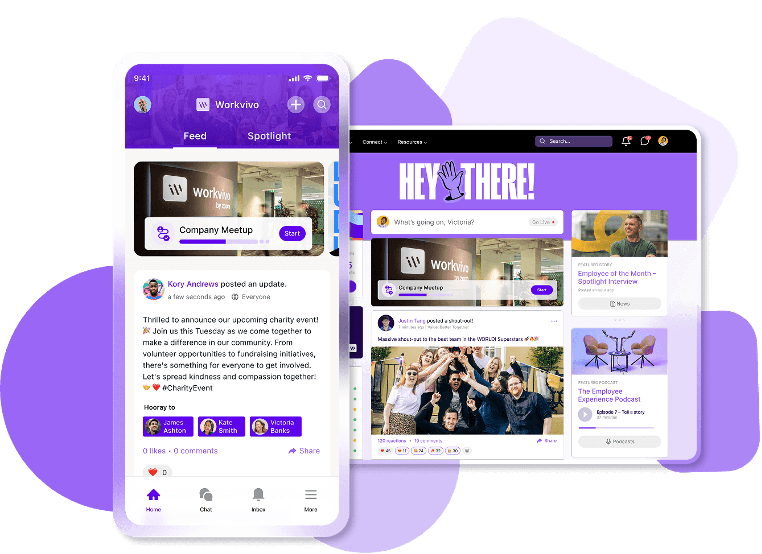
More importantly, Workvivo matches today’s work reality in ways other platforms don’t:
- Built for distributed teams from day one: Activity feeds keep remote employees visible, spaces unite teams, and everything syncs instantly.
- Mobile accessibility for every worker: Full mobile functionality for frontline, field, and office workers.
- Social intranet features that feel familiar: Feeds, comments, and reactions like Facebook or Instagram.
- Instant updates across all devices: Company news and livestreams reach everyone simultaneously.
- Enterprise-grade security: ISO 27001, SOC 2, and GDPR compliance.
- Culture-building tools included: Recognition, rewards, and celebrations as standard features.
- Integrates with your entire tech stack: Microsoft, Google, Slack, HR systems, and more.
These features also explain why companies choose Workvivo over SharePoint and even newer platforms like Happeo or Simpplr.
While SharePoint struggles with basic functionality and Happeo focuses primarily on internal communications, Workvivo delivers a complete platform that handles everything from document storage to employee recognition.
What happens when you make the switch (case study)
Ryanair runs Europe’s most extensive airline network, with 3,000 flights daily carrying 500,000 passengers to destinations in 40 countries.
Communication at Ryanair was broken, and 20,000+ employees worked in isolation. Pilots didn't talk to ground crews, cabin staff couldn't reach office teams, and nobody shared information across departments.
With plans to hire 10,000 more people each year, the airline needed a platform to connect everyone.
Here’s what happened when Ryanair launched Workvivo:
- 90% adoption in 6 weeks: 21,500 employees registered and started using the platform across all departments and roles.
- Weekly engagement from 13,000 employees: Staff regularly access Workvivo for updates and peer connections.
- 30% more internal job applications: Employees could finally see and apply for headquarters positions they never knew existed.
Mark Duffy, Director of Talent at Ryanair, talked about their experience with the platform:
“We are a low-cost airline, so to invest in something like this was a big deal for us. We wanted to make sure that whoever we brought on board for our internal comms platform was working with big players out there as well.”
Workvivo vs. intranet alternatives
| Platform | Best for | Key strengths | Limitations | Pricing |
|---|---|---|---|---|
| Workvivo | All-in-one employee experience platform | Unified communication hub, mobile-first | Active feeds can bury older posts | ~$20K/year (250–2,000 employees) |
| Simpplr | Simplicity and fast adoption | AI personalization and auto-governance | Limited customization and mobile editing | Custom pricing |
| Unily | Complex global enterprises | Multi-brand architecture | Slow support and extra costs | Custom |
| Microsoft SharePoint | Deep Microsoft 365 users | Powerful workflow automation | Poor mobile experience | $5/user/month |
| Google Workspace | Google ecosystem users | Real-time collaboration | Basic intranet features | $6–$22/user/month |
| Confluence | Technical teams | Strong knowledge sharing | Not a full intranet | $5–$10/user/month |
| Staffbase | Large frontline orgs | Branded mobile apps | Expensive for small orgs | Custom |
| Firstup | Global multilingual comms | Omnichannel automation | Complex notifications | Custom |
| Blink | Frontline-heavy industries | Central hub with forms | Basic feature set | $4.50/user/month |
While each platform has its strengths, the comparison makes it clear why Workvivo works better for most organizations:
- Unlike Simpplr’s limited customization or Blink’s basic features, Workvivo includes everything from social engagement to analytics in one platform. You won’t need multiple tools or expensive add-ons.
- The social design means both frontline workers and office teams can easily use it. SharePoint and Confluence struggle with user adoption due to complexity, while pure collaboration tools like Google Workspace miss the employee engagement element.
- Full functionality on mobile devices sets Workvivo apart from SharePoint’s poor mobile experience and platforms like Confluence that weren’t built for mobile-first access. Every employee gets the same rich experience.
- At around $20K annually for mid-sized companies, Workvivo provides better value than enterprise-only solutions like Unily or Staffbase while offering more features than budget options like Blink.
Measuring the success of a new intranet solution
The only way to know if your company intranet replacement succeeds is to measure it. Here are a few key metrics that help you spot problems early and prove the investment was worth it.
| Category | What to measure | Target benchmarks |
|---|---|---|
| Adoption | Monthly active users, login frequency | 80% registered in 30 days, 70% weekly active |
| Engagement | Posts, comments, recognition activity | 30% content increase, 5+ interactions/user |
| Business impact | Support tickets, time to find info | 50% fewer tickets, 2-min search time |
| Cultural | Sentiment, participation, connections | 70% positive sentiment, 10+ new connections |
Note: Use these targets as general guidelines. Your actual benchmarks will depend on company size, industry, and existing adoption rates.
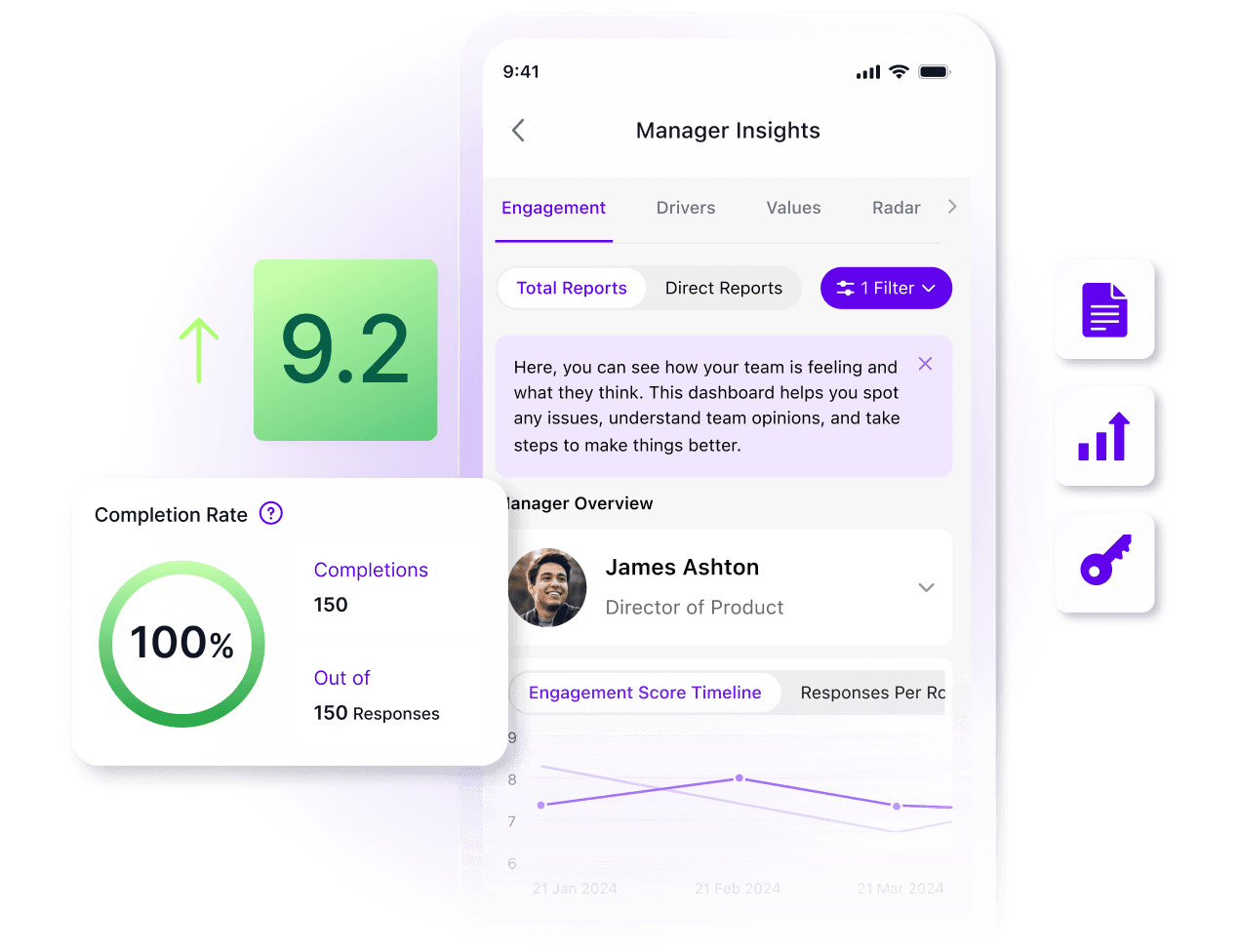
You should track metrics through automated reports, not spreadsheets. Most modern platforms provide analytics dashboards and templates, though you’ll need IT data to set up pre-migration baselines.
And set realistic goals based on your culture. Past intranet failures mean slower starts but often stronger eventual adoption once employees trust the new platform.
PRO TIP 💡: Workvivo’s built-in analytics feature replaces manual tracking with real-time dashboards. Watch adoption rates climb, see which departments need support, and track what content works best. You get the data you need to fix problems before employees give up on the platform.
Common mistakes when replacing legacy intranets
If your new intranet feels like SharePoint with a fresh coat of paint, you probably made these mistakes during the switch. Here’s what typically goes wrong and how to fix it:
- Launching everything at once to “get it over with” → Rolling out 50 features simultaneously guarantees nobody learns any of them properly. Begin with core features like search and document sharing, then add capabilities once people are comfortable.
- Choosing a platform based on IT requirements alone → Include HR, communications, and actual end users in selection. Frontline workers have different needs than office staff. The platform IT loves might frustrate everyone else.
- Copying your SharePoint structure into the new system → Your messy folder hierarchy and confusing permissions grew organically over years of workarounds. Start fresh with a simple structure based on how teams work today, not how SharePoint forced them to organize.
- Treating mobile as an afterthought → Testing mobile after launch means your frontline workers get a broken experience from day one. Include mobile employees in your pilot group and test every workflow on phones before going live.
- Migrating all your old content “just in case” → Bringing 10 years of outdated documents means users can’t find anything useful in search results. Migrate only content accessed in the last year, and give read-only access to the old system for edge cases.
- Choosing the cheapest option without considering total cost → That bargain platform might need expensive add-ons, custom development, and dedicated IT resources. Calculate five-year total cost, including licenses, implementation, training, and ongoing support.
Why Workvivo is the modern alternative
If your team avoids SharePoint, creates their own file systems, and constantly needs IT support for simple tasks, it's time for Workvivo's modern approach.
Here's a quick recap of what you get with Workvivo:
- Activity feeds and spaces connect remote, hybrid, and office employees in real time
- Frontline workers get the same complete experience as desk employees on mobile
- Feeds, comments, and reactions work like the apps employees already use daily
- Updates, news, and livestreams reach everyone instantly across all devices
- ISO 27001, SOC 2, and GDPR-compliant with granular permission controls
- Peer rewards and celebrations come standard, not as paid extras
- Connects with Microsoft, Google, Slack, and your HR systems in one platform
Your intranet should bring teams together, not create more barriers. Workvivo delivers the modern digital workplace experience your employees expect and deserve.
Schedule your demo today.
Discover more content on modern intranet:
- The Modern Intranet for 2026: Core Elements, Features + Benefits
- Advantages and Disadvantages of Intranets: Complete Guide for 2026
- 9 Intranet Alternatives to Modernize Your Digital Workplace This Year
- I Spent 30+ Hours Comparing Intranet Platforms: Here Are the 9 Clear Winners
- Intranet Pricing Guide: How Much Does An Intranet Really Cost?
- Traditional vs. Modern Intranet: What's the Difference?
- How to Choose the Best Intranet Platform for Your Organization
- Your 9-Step Plan for a Successful Intranet Implementation
- How to Improve Intranet Adoption With These Proven Methods
- Intranet vs. Digital Workplace: What’s the Difference?
- On-Premise Intranet vs. Cloud-Based Intranet: Comparison Guide for IT Teams and Enterprises
- The Buyer's Guide to a Scalable Intranet: Key Considerations and Evaluation Tips
- How a Modern Intranet Improves Employee Onboarding Experiences
- How to Develop an Intranet Knowledge Management Strategy
- The 10 Best Hybrid Workplace Solutions (Ranked & Rated)
- Intranet Governance Framework for a Successful Company Intranet
- 7 Secure Intranet Software Vendors for Security-Focused IT Teams
- Intranet Hosting & Deployment Options: Which Do You Need?
- The 5 Most Important Intranet Integrations for Maximizing Your Digital Workplace
- How to Create an Intranet Content Strategy
- 14 Real Company Intranet Examples for Different Industries
- What is an Intranet Portal? Everything You Need to Know
- What Is Intranet CMS + 6 Best Options
- 15 Best Intranet Platforms & Solutions on the Market Right Now
- Top 6 Social Intranet Solutions (+ Benefits, Features & Best Apps)
- Enterprise Intranet: Use Cases & Top Rated Vendors for 2026
- 15 Intranet Best Practices for Better Employee Engagement
- 10 Top Use Cases and Benefits of an Intranet
- The Ultimate Guide to Intranet Security: Best Practices, Threats & Solutions
- Using Intranet for Effective Internal Communications: Advantages, Best Practices and Top Tools to Get Started
- What is a SaaS Intranet? Benefits, Features & Best Intranet Solutions
- Intranet Analytics: Best Practices for Measuring Adoption and Success
- Are Intranets Still Relevant? (And How They're Evolving)
- Top 25 Intranet Features for a Connected Workplace
- Exploring the Value of Intranet Benchmarking: What To Know
- The Definitive Guide to Measuring Intranet ROI In 2026
- Intranet Requirements Checklist to Support an Intranet Needs Analysis
- 10 Reasons Building Your Own Intranet Is a TERRIBLE Idea
- Intranet Metrics: Top 6 KPIs to Track (+Real Examples)
- How To Implement an Intranet Migration Without the Headache